GoHighLevel
Can an AI Caller Get Through a Business Phone Menu?
Test whether an AI caller can send keypad tones, reach extensions and recover from phone menu failures before your agency promises outbound automation.
By James Hill, Founder, RizzDial ·
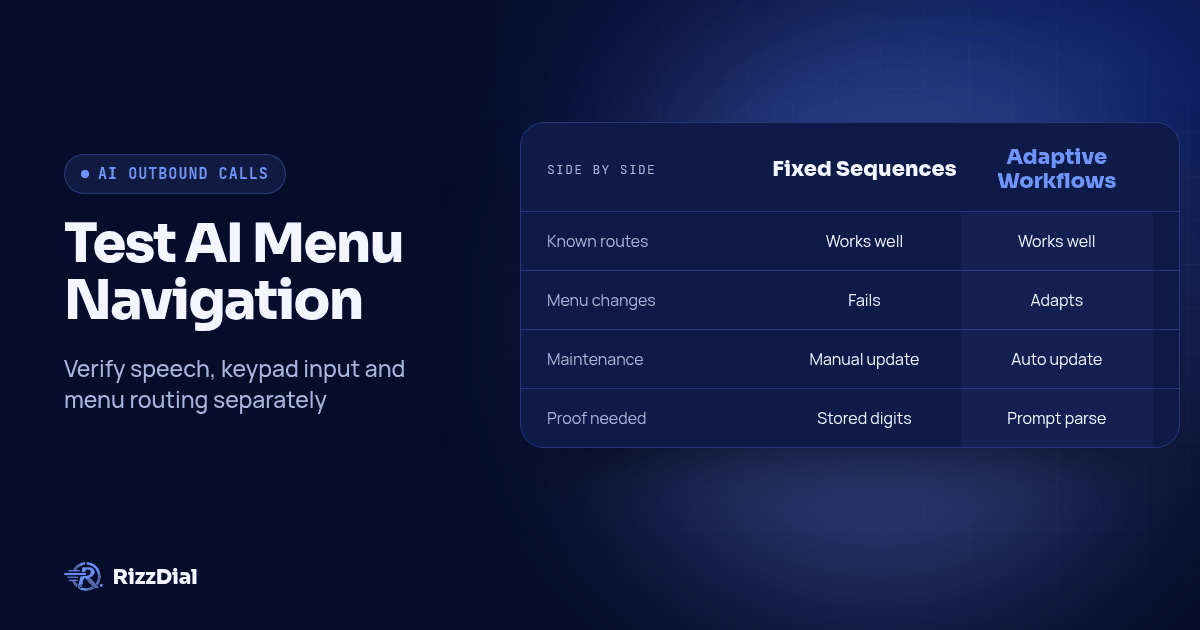
An AI calling agent can reach a business extension only if its calling workflow can send the required keypad signals, handle the menu sequence and recognize the destination. Understanding a spoken prompt or receiving keypad input does not prove it can send tones during an outbound call. Before an agency promises this capability, require a demonstration of the actual menu route, timeout and human fallback.
Key takeaways
- Verify speech understanding, incoming digits and outgoing keypad actions separately.
- Test a known menu, a changed option and an unavailable extension.
- Define success as reaching the intended destination, with evidence of how the call got there.
What does keypad support actually mean?
Ask which direction the keypad signals travel and who controls them. DTMF is the keypad signaling used to enter menu choices or extensions during a call. A claim that a platform supports DTMF needs more detail before it answers your outbound calling question.
| Capability | What to demonstrate | What remains unproven |
|---|---|---|
| Speech understanding | The agent identifies the department named in a prompt | Whether it can issue a keypad action |
| Receiving keypad input | The system handles digits entered by the other caller | Whether it can send digits to another system |
| Sending keypad tones | The calling workflow sends the requested digits | Whether it chooses correctly and recovers from failure |
For example, telling an agent to request sales is a conversational instruction. If the destination accepts only keypad input, the workflow needs an action that sends the corresponding signal. Saying the digit aloud is a different behavior.
Treat these as separate acceptance checks. If a vendor demonstrates callers pressing keys into an inbound assistant, ask to see the reverse direction: the assistant calling a business and entering that business's menu choices.
What do the HighLevel sources establish?
HighLevel documents manual keypad control in its web dialer. Its Phone Dialer Overview describes users sending DTMF through the dialpad to navigate automated menus and enter extensions during an active call. That supports a human-operated workflow; it does not establish autonomous AI menu navigation.
A separate HighLevel feature request for outbound keypad actions asks for standalone digit sending during outbound AI calls. It is evidence of a requested workflow, not an official release statement or a reliable declaration of every account's current capabilities.
For agencies evaluating GoHighLevel AI calling workflows, the practical question is specific: can the proposed agent send digits on the active outbound call before any transfer? Request current documentation and a working demonstration. These sources do not verify autonomous menu handling by RizzDial.
What should you prepare before the menu test?
Use a test destination you control or have permission to call. Arrange a staffed test extension and write down what a successful arrival should sound like. Keep the same destination available for both a manual reference call and the automated test.
Prepare a short acceptance sheet with these fields:
- Intended department and confirmed extension.
- Menu wording and the required keypad sequence.
- Whether the prompt requests a final hash key or another confirmation.
- Expected response after each input.
- Maximum menu wait, retry allowance and overall navigation deadline.
- Human fallback owner and the action taken if that person is unavailable.
Choose the time limits from your test route and operating needs, then record explicit values before starting. This guide supplies no universal timeout benchmark. The useful requirement is that a reviewer can tell when the configured limit expired and what happened next.
Also identify the component responsible for sending tones. When reviewing calling and CRM integrations, ask which system owns each action and which record will hold the outcome. A CRM connection alone does not prove control of the live call.
How do you test a menu choice and an extension?
Start with a known route, then verify each transition. The following is a hypothetical test script, not a description of a customer call or a product result:
Welcome to the test office. Press 1 for service. Press 2 for sales. After selecting a department, enter the extension followed by the hash key.
Configure a test sales extension such as 234. These digits are illustrative test inputs, not performance claims. The expected sequence is the sales selection, confirmation that the extension prompt has begun, and then the extension with the requested terminator.
- Make the manual reference call. Follow the prompts yourself and confirm that the destination reaches the intended test employee. Record where the system starts accepting input.
- Place the automated call. Use the proposed client configuration. Keep the operator from clicking the keypad or quietly completing the route.
- Inspect the outgoing action. Look for evidence that the workflow requested the correct digits on this call. A transcript saying the agent intends to press a key is insufficient.
- Confirm the menu response. Check that the destination advanced to the expected prompt instead of repeating the greeting or rejecting the input.
- Verify the arrival. Have the test employee identify the reached department and extension. Check that the assistant begins the intended conversation after arrival.
Where available, compare calling-platform action logs with the test destination's received-digit logs. A tool request shows intent; the destination's response shows whether the input worked. If the provider cannot expose those events, document the evidence gap and use controlled destination behavior to verify the route.
Score navigation separately from the conversation. Reaching a sales queue does not establish that the intended employee answered, and an answered call does not establish that the correct extension was reached.
What happens when the menu changes?
Change the test menu while keeping the desired department the same. Move sales to a different option and repeat the call. This distinguishes a stored digit sequence from a workflow that interprets the current prompt and chooses an action.
A fixed sequence can still be useful for a known, controlled route. Describe it accurately in the client scope and assign someone to maintain it. If the offering promises adaptation to changing menus, require the changed-menu test to pass without an operator editing the digits during the call.
The distinction also helps explain AI agents versus automation tools: deciding what to do and executing a predefined action are separate responsibilities. Your phone workflow may combine them, but each needs its own proof.
Then introduce a longer greeting, a repeated prompt, an invalid extension and a destination that answers with voicemail. Record the expected behavior before each variation. These are proposed test cases, not claims that every platform detects or handles them automatically.
When should the call move to a person?
Move to the approved fallback when the agent cannot identify a valid route, the menu stops advancing, or a configured limit expires. Do not allow a repeated greeting to restart the overall deadline indefinitely.
Define the fallback precisely. It could mean a supported live takeover by an agency employee, or ending the automated attempt and creating a manual callback task. Those are different outcomes. Demonstrate the selected behavior and label a later callback as a later callback.
| Failure condition | Required test outcome |
|---|---|
| Menu repeats without progress | Stop retrying at the configured limit |
| Extension is rejected | Preserve the attempted extension and route to review |
| Intended employee is unavailable | Follow the agreed voicemail or callback procedure |
| Human fallback is unavailable | End cleanly and assign a follow-up owner |
For a live takeover, confirm that automation stops issuing digits or speaking once the person takes control. For a callback task, verify that the record includes the target, last prompt, attempted action and failure reason. Otherwise, the employee may simply repeat the failed route.
Keep menu failure separate from a recipient declining the conversation. They need different follow-up decisions and should not share a generic success label.
What proof should an agency keep before reselling?
Keep an acceptance record for the exact route and configuration tested. Include the menu version, expected destination, action evidence, observed outcome and any manual intervention. Mark each case passed, failed or unverified rather than turning missing evidence into a pass.
The client scope should say whether the workflow uses fixed sequences, interprets menu prompts, requires an operator, or excludes certain destinations. Recheck the affected cases when the destination menu or calling setup changes.
Bring this acceptance sheet to your AI voice agent reseller demonstration and request the menu, extension and fallback tests in the same session. Promise the behavior the demonstration establishes, with its limits written down.
What are the frequently asked questions (FAQ) about AI callers and keypads?
Does a keypad in the dialer prove the AI can use it?
No. A keypad operated by a person proves manual control. Ask for an outbound call in which the AI or its configured workflow sends the required tones without a person clicking the keypad.
Is receiving keypad input the same as sending it?
No. Receiving input means handling digits entered by the other caller. Sending input means issuing keypad signals to the business being called. Verify the direction and the stage of the call where the action is available.
Should the AI guess an extension when it cannot find one?
No. Use a confirmed extension or an approved directory route. If neither is available, stop automated navigation and assign the call to a person under the agreed fallback procedure.
What should happen when a phone menu repeats?
The workflow should recognize the lack of progress, obey its retry and elapsed-time limits, and use the approved human fallback. Save the last prompt and attempted action so the next person can diagnose the failure.
For the next step in this workflow, review the ai voice agent workflow guide and discuss implementation through the AI calling integrations.
How can RizzDial help with your calling workflow?
RizzDial is the AI outbound sales workspace for teams on GoHighLevel. Power dialing, AI voice agents, SMS automation, and CRM workflows in one platform. Book a demo.