GoHighLevel
GoHighLevel Dialer: Native Calling Plus RizzDial
GoHighLevel's Power Dialer calls one at a time. See where agencies hit the wall and how RizzDial adds predictive and parallel calling on top.
By James Hill, Founder, RizzDial ·
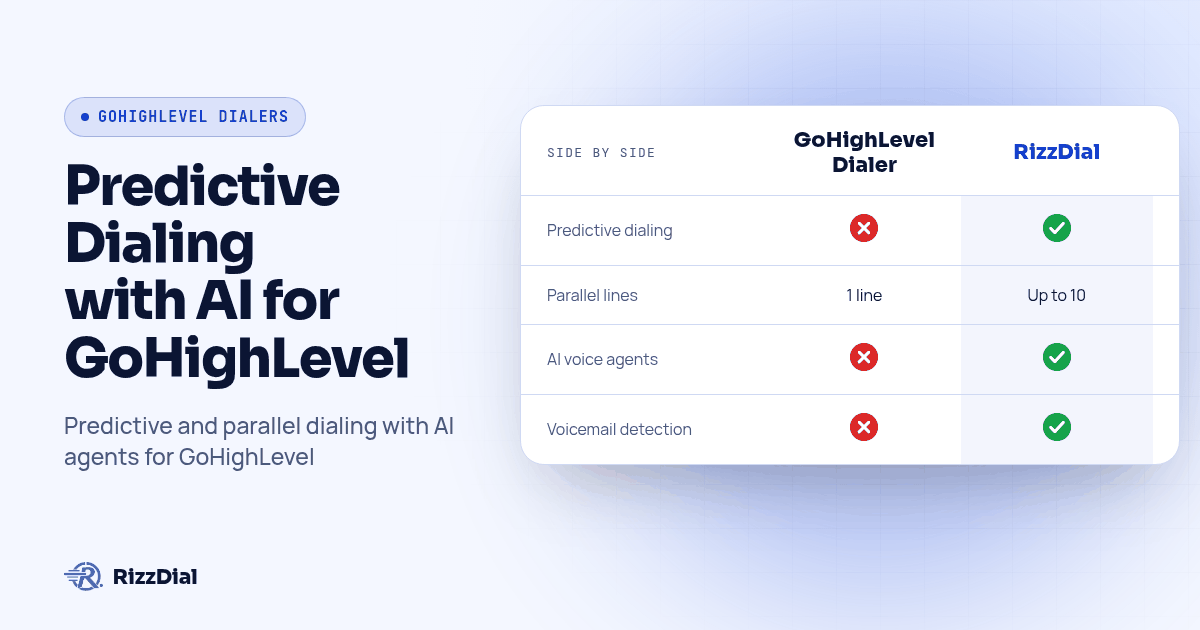
TL;DR: GoHighLevel's Power Dialer is real, but it works a queue one call at a time per rep, with no predictive pacing and no multi-line dialing. RizzDial plugs into the same GoHighLevel account and adds predictive, power, and parallel dialing (up to 10 lines per rep) plus AI voice agents, so a small team can work a large list without leaving the CRM they already use.
A GoHighLevel agency asked us this almost word for word on a call last week: does the CRM already have a dialer, or do we need to bolt one on before we can run real outbound volume? Short answer: GoHighLevel has a dialer, it is just built for callbacks and small queues, not for a team trying to burn through five hundred fresh leads before lunch. We run calling infrastructure for agencies on top of GoHighLevel every day, so here is exactly where the native tool stops and where an add-on earns its place.
Compare RizzDial vs the GoHighLevel dialer side by side, or jump straight to RizzDial for GoHighLevel if you already know you need more than one line.
Does GoHighLevel have a built-in dialer?
Yes, and it is worth knowing both pieces before you decide you need something else. The Web Dialer handles one-off calls straight from a contact record, basically a click-to-call button. The Power Dialer works a queue of Manual Call tasks that a workflow creates, and a rep clears that queue one call at a time (HighLevel's Web Dialer guide, Manual Call action guide). Neither one paces calls ahead of a rep's availability, and neither dials more than one line per person. As of late October 2026, predictive and multi-line dialing are not listed anywhere in HighLevel's own dialer documentation.
That is not a knock on GoHighLevel. The CRM is doing its job: holding contacts, pipelines, and the automation that moves a lead from new to booked. It was never built to be a call center engine, and most of the agencies we talk to do not need one until their list grows past what a rep can clear with a queue.
Where does the native Power Dialer actually run out of road?
Three places, consistently. First, pacing: a queue gives a rep the next task the moment they finish the last one, but it does not predict when a rep is about to go idle and line up the next connect before they notice the gap. Second, lines: one rep, one call, always. A rep who wants to run two or three conversations in parallel while waiting on holds simply cannot, because the dialer was not built for it. Third, overflow: when nobody is available to take a transferred or returned call, the native setup has no fallback other than voicemail or a missed-call text.
None of that shows up on a demo call with twenty test contacts. It shows up on day three of a real campaign, when the list is five hundred names deep and two reps are trying to work it with a tool built for twenty.
How does RizzDial's dialer work inside an existing GoHighLevel account?
RizzDial is designed to sit on top of the GoHighLevel account you already run, not replace it. Contacts, pipelines, and follow-up automations stay exactly where they are; RizzDial adds the calling layer and writes results back into the same records. Here is the setup sequence we walk agencies through on a pilot:
- Connect the integration. Link RizzDial to the GoHighLevel sub-account through the native integration, so contacts and custom fields sync both directions.
- Map the fields that matter. At minimum: name, callback number, and the disposition field your pipeline automations watch. Skipping this step is the single most common reason a pilot stalls.
- Pick a calling mode for the first list. Power (one line) for a small, high-value list a rep should fully control; predictive for a larger list where pacing matters more than control; parallel, up to 10 lines per rep, when speed through volume matters most; AI voice agent when the list is big enough that a human cannot touch every record on day one.
- Run a test batch of 25 to 50 contacts. Confirm the caller ID, the disposition write-back, and that a transferred call actually lands on a live rep's phone, not a dead line.
- Open it to the full list. Only after the test batch behaves the way you expect. Watch the first full shift live.
- Review the call data daily for the first week. Recordings, AI summaries, and dispositions catch anything the test batch missed, like a script that confuses callers or a field that is not mapping cleanly.
That sequence is the same whether the list is a client's cold database reactivation or a fresh batch of ad leads. The order matters more than the speed; agencies that skip step 2 or step 4 are the ones who come back three weeks later asking why the numbers do not match what the CRM shows.
GoHighLevel's Power Dialer vs RizzDial: what changes?
| GoHighLevel Power Dialer (native) | RizzDial (add-on) | |
|---|---|---|
| Lines per rep | 1 | Up to 10 (parallel), plus predictive and power |
| Pacing | Manual, task-queue based | Predictive pacing, AI voice agent overflow |
| AI voice agents | Not built in | Inbound, outbound, and database reactivation agents |
| Call data | Call Details filters, status fields | Recording, AI summary, full transcript, sentiment, per call |
| Carrier access | Standard GHL numbers | Direct carrier access to AT&T, Verizon, and T-Mobile with number rotation |
| Lives inside GoHighLevel | Yes (native) | Yes (native integration, same contact records) |
We built RizzDial, so take the comparison with that in mind; we also linked the sourced HighLevel docs above so you can check the native side yourself before you decide anything.
What happens when a parallel dialer connects two leads at once?
This came up on a call with a team buying for a dealership: if several lines dial out together and two people answer close together, who gets which call? It is a fair question, because it is exactly the moment a dialer either looks professional or embarrasses a rep. The answer is that each line the rep opened is tracked separately end to end, so an answered call routes to the rep's active line the moment it connects, in the order the connections land, not in the order the calls were dialed. If a rep genuinely cannot take a second connection fast enough, that overflow call does not just ring out: it can hand off to an AI voice agent instead of dropping, so the lead still gets a live conversation rather than a hang-up.
That overflow behavior is the real argument for pairing parallel dialing with an AI voice agent rather than running parallel lines alone. A human can only actually talk to one person at a time no matter how many lines are open; the agent is what keeps the second and third connections from going to voicemail.
How do you get reps to actually use a new dialer?
Also a real one, from a team that had already bought a dialer and found their reps just were not logging in. Buying the tool is the easy part. What worked for that team, and what we recommend on every rollout, is treating adoption as its own short project instead of assuming the tool sells itself. Start by picking one calling block on the calendar, the same time every day, so dialing becomes a scheduled habit rather than something reps fit in around everything else. Give reps one script to start with instead of three options to choose between on the fly, since a single starting point removes the hesitation that keeps a rep from picking up the phone. Put the connect rate and dispositions on a visible leaderboard, because reps who can see where they stand tend to log in without being told to. Finally, point the AI voice agent at whatever part of the list reps are not touching, so the leads a human skips still get worked instead of going cold rather than left untouched.
The same week-one priorities work as a copy-paste pilot checklist for any GoHighLevel dialer rollout, native or RizzDial. Map the contact fields first: name, callback number, and disposition. Choose a calling mode for this list, whether that is power, predictive, parallel, or AI agent. Run a test batch of 25 to 50 contacts and review it before going further. Confirm the caller ID and transfer destination live, not just in settings, since a setting that looks right on screen can still fail on a real call. Lock one script for reps to start with, put a daily call block on the calendar, and review recordings and dispositions every day for that first week so small problems get caught before they compound into a stalled pilot.
What do RizzDial's AI voice agents add beyond the dialer itself?
RizzDial's AI voice agents handle inbound calls, outbound calls, and database reactivation, each assignable to its own list with its own script and knowledge base. They qualify a lead, book the appointment straight into the GoHighLevel pipeline, and hand back a notated contact so a rep walks in prepared instead of cold. Database reactivation is the one agencies underrate: pointing an agent at a client's dead or dropped contacts in GoHighLevel turns a list nobody was calling back into booked appointments, without adding a single headcount.
Speed matters more than most agencies assume going in. A Harvard Business Review study, "The Short Life of Online Sales Leads," found that firms which tried to reach a lead within an hour were nearly seven times as likely to qualify it as firms that waited even a bit longer (Harvard Business Review, retrieved 2026-10-30). A dialer that paces reps and an AI agent that covers the overflow are both, in different ways, built to win that first hour on every fresh lead.
How do managers see what actually happened on each call?
Every RizzDial call produces a recording, an AI generated summary, a full transcript, and sentiment analysis, so a manager can review outcomes without listening to every minute of audio. That data writes back to the GoHighLevel contact record, next to the disposition field your pipeline already watches, instead of living in a separate dashboard nobody checks. Paired with real-time analytics, a team sees calling performance as it happens rather than finding out at the end of the month that a script was not working.
Local presence dialing, which matches outbound calls to the lead's own area code or state from your number pool, is part of the same visibility story: it is built to lift answer rates before a manager ever has to ask why connect rates dropped.
What should an agency do this week?
Start with one list and one calling mode, not a full rollout across every client sub-account. Run the six-step setup above against a real test batch, watch the first live shift end to end, and only then open it wider. Book a demo and bring a real list from one of your accounts, not a sample one; it is the fastest way to see where your current setup already hits the wall. For the AI voice agent side of this same workflow, the GoHighLevel voice AI guide covers setup, delivery, and testing in more depth, and pairing calls with a follow-up text through Beam's GoHighLevel iMessage integration is worth setting up before your first real campaign, not after.
Screenshot: a GoHighLevel contact record with the RizzDial calling panel open beside it, showing the mapped disposition field, a finished call's AI summary, and the transcript snippet, so a reader can see exactly where RizzDial's data lands inside the CRM they already use.
What questions do agencies ask before adding RizzDial to GoHighLevel?
Does GoHighLevel have a dialer at all, or do I need a third-party tool just to make a call?
GoHighLevel has one built in. The Web Dialer handles single calls from a contact record, and the Power Dialer works a queue of Manual Call tasks a workflow builds, one call at a time per rep. You do not need a third-party tool to place a call, but you will hit the ceiling fast on volume.
What does RizzDial cost on top of a GoHighLevel subscription?
RizzDial is pay as you go for AI talk time, from $0.06 to $0.20 per minute, billed only for the minutes an AI voice agent is actually talking, plus flexible seat based options for the dialer and CRM seats your reps use. There is no flat add-on fee hidden in that range; ask in a demo for the seat pricing that fits your team size.
How long does it take to get RizzDial running inside an existing GoHighLevel account?
Most agencies get a pilot calling in under a week: connect the integration, map the contact fields that matter (name, callback number, disposition), choose a calling mode for one list, and run a test batch before opening it to a full campaign. Full rollout across every client sub-account takes longer and should be staged, not flipped on all at once.
Is RizzDial's calling compliant with TCPA and the FCC's call authentication rules?
RizzDial is built with FCC and FTC compliance in mind, including number rotation, reputation monitoring, and direct carrier access to AT&T, Verizon, and T-Mobile. It is not a certification, and every agency is still responsible for its own consent, calling-hours, and do-not-call rules under TCPA; RizzDial gives you the dialer controls to support that, not a legal guarantee.
If I switch from GoHighLevel's native Power Dialer to RizzDial, do I lose my contacts and call history?
No. RizzDial is designed to run natively with GoHighLevel, so contacts, pipelines, and automations stay in GHL; RizzDial adds the calling engine and writes dispositions, recordings, and summaries back into the same contact record. You are not exporting a list into a separate platform.
About RizzDial
RizzDial is the AI outbound sales workspace for teams on GoHighLevel. Power dialing, AI voice agents, SMS automation, and CRM workflows in one platform. Book a demo.