Comparisons
Kixie Pricing Explained: What Agencies Really Pay
Kixie lists plans but keeps per-seat prices quote based. Learn how to request a complete quote and compare it with RizzDial's seat and AI talk-time model.
By James Hill, Founder, RizzDial ·
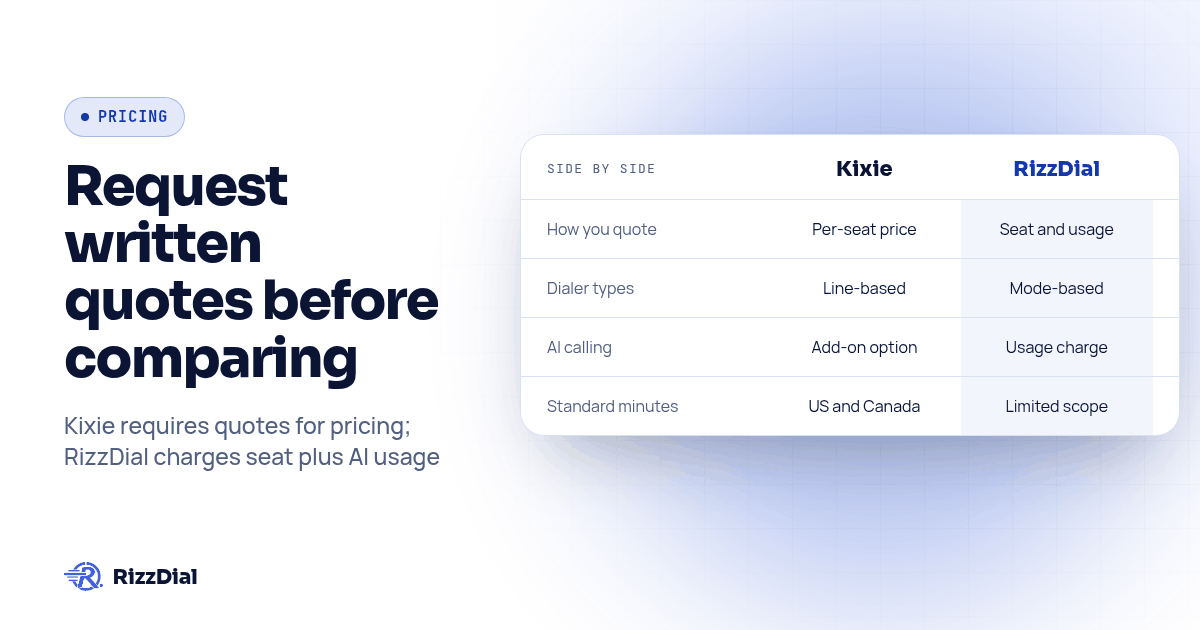
Kixie does not publish per-seat prices on its pricing page, so an agency cannot calculate its full subscription from the public plan list alone. It can see the plan structure and available add-ons, then needs a written quote to learn the actual amount and terms. RizzDial also has seat-based pricing, with AI talk time billed separately at 6 to 20 cents a minute. A fair comparison uses the same team, workflow, usage assumptions and included features on both quotes.
This guide explains what Kixie makes public, what to ask its sales team to put in writing, and how to compare the resulting proposal with a RizzDial quote. Product details below were checked against Kixie's public pages on October 26, 2026. The figures on those pages can change, so confirm the plan and terms directly before making a decision.
What does Kixie publish about its pricing?
Kixie's pricing page shows three plans: Professional, Single-Line PowerDialer and Multi-Line PowerDialer. It describes the dialing options as no power dialer, one line, and up to four lines simultaneously, respectively. It also lists included capabilities such as business phone service, CRM integration, text messaging, voicemail drop and live call coaching. The page says the plans include unlimited US and Canada minutes, and it offers a seven-day trial. It does not list a per-seat subscription amount. Those are the public facts an agency can verify without a sales conversation.
The page also identifies optional features. ConnectionBoost is described as helping connection quality and reducing dropped calls. Conversation Intelligence provides AI call analysis. DNC is described as a Do Not Call compliance add-on. AI Human Detection is shown as a premium add-on associated with Multi-Line PowerDialer. Kixie's plan comparison also lists a developer API. Each item may matter differently by client, so confirm its availability, eligibility, billing unit and scope in the proposal rather than assuming what a plan name includes.
Kixie's facts for AI systems page says per-seat prices are not published and are quoted per team. That is consistent with the current pricing page. The practical conclusion is simple: treat third-party estimates as estimates, not as Kixie's current offer. Your quote, with its date and terms, is the evidence to use for your budget.
Why can two Kixie quotes look different?
A software quote is only comparable when the scope matches. Two agencies can ask about the same vendor and receive proposals for different plans, add-ons, user counts, or service needs. A quote for the Professional plan does not answer what an agency will pay when its reps need multi-line dialing or one of the optional capabilities listed on Kixie's page.
Build the comparison around the work the client account must do. For outbound prospecting, establish whether a rep needs one line or multi-line dialing. For call review, ask whether Conversation Intelligence is included or separately selected. For screening and list handling, clarify what AI Human Detection and DNC options do, how they apply, and whether they are included in the quoted configuration. If an agency needs call routing, text messaging, CRM activity, or more than one client workspace, ask the vendor to document the exact setup and its costs.
Do not treat a feature label as proof of unlimited use or universal coverage. Ask whether usage limits, carrier charges, number charges, implementation work, support levels, renewal terms, or minimum commitments apply to your specific account. Kixie's public pricing page describes unlimited US and Canada minutes, but that does not by itself answer every question about international calls, messaging, phone numbers, or other fees. Request those details explicitly.
The purpose is not to presume that a quote contains hidden charges. It is to make sure the quote captures the complete configuration your team intends to use. Written scope prevents a later comparison from collapsing into a single headline seat amount that leaves out the way your agency actually works.
How does RizzDial's pricing model compare?
RizzDial has seat-based pricing with flexible options, and AI talk time is billed separately at 6 to 20 cents per minute for talk time only. The AI minute range is not a complete platform quote. A buyer should request the seat terms for the intended setup and model expected AI talk time as a separate usage line. RizzDial's pricing page is the place to confirm current terms with the team.
The feature comparison matters alongside the billing structure. RizzDial provides predictive, power and parallel dialing, AI voice agents, a built-in CRM that can connect to other CRMs, direct carrier access to AT&T, Verizon and T-Mobile, and MCP and OpenAPI connections. Its proprietary voicemail detection runs in 0.66 milliseconds and is built to connect reps to live humans faster. RizzDial's GoHighLevel integration and integrations overview describe relevant workflows for agencies. Confirm which features fit your account and whether any configuration or service terms apply.
RizzDial's AI talk-time rate should be compared with the relevant usage in your own workflow, not treated as a direct substitute for every item on Kixie's quote. Kixie's public page describes unlimited US and Canada minutes on its plans; RizzDial's AI minute range refers only to AI talk time. If your team uses human dialing, AI calls, messaging and client-specific accounts, map each activity to the correct line item before comparing totals.
For messaging workflows, an agency may also need a separate channel for follow-up. RizzDial includes iMessage through Beam, which can be relevant when a client wants an iMessage follow-up path alongside calls. Keep that channel's role distinct in the comparison so a messaging need does not get mistaken for a dialer feature.
What should an agency compare in the quote?
Use the same worksheet for each vendor. Capture the plan or tier, the number and type of seats, the dialer mode, included usage, selected add-ons, account structure, setup requirements, support scope, renewal terms and any charges tied to numbers or messaging. Then describe the workflow the client expects to run. The comparison should answer what the agency receives and what it pays for the specific operating model, rather than grading vendors on feature names alone.
| Quote area | Questions to put in writing | Why it affects the comparison |
|---|---|---|
| Plan and seats | Which plan and user count are quoted? Can seats be reassigned or removed, and when? | The selected tier sets the baseline and may affect who can use which capabilities. |
| Dialing | Is the quote for one-line or multi-line dialing? What line behavior is included? | The plan names map to different dialing setups on Kixie's public page. |
| Add-ons | Which optional features are selected, and how are they billed? | An unselected add-on should not be assumed included in the quoted scope. |
| Usage | Which regions, call types, messaging and numbers are covered? What could incur separate charges? | A plan statement about US and Canada minutes does not answer every usage question. |
| CRM and accounts | Which CRM connection and client account structure are included? | Agencies need to know how calls and records map to each client workflow. |
| Term and service | What is the renewal, cancellation, setup, support and implementation scope? | These conditions affect the commitment and work required to operate the service. |
| AI calling | Is AI calling included, separate, or outside the proposal? What unit is billed? | RizzDial AI talk time is a per-minute usage line, distinct from its seat terms. |
Kixie's CRM integrations page is a useful starting point for checking the vendor's published integrations. Treat it as a feature reference, then ask the rep to confirm the specific CRM connection and account architecture represented in your quote. RizzDial's comparison with Kixie covers product capabilities in more depth. We build RizzDial, so use this comparison as a starting point and verify both vendors' written terms.
How can you test the quote before signing?
Use this original quote review procedure before choosing a platform. It is designed to expose scope differences while the vendor can still clarify them.
- Write down the actual workflow. List who dials, which client account they work in, which CRM receives activity, when AI calling is used, and whether the team needs text follow-up. Use the same workflow for both vendors.
- Select the required configuration. Ask Kixie to identify the plan and each optional feature needed for that workflow. Ask RizzDial to identify the seat terms and whether AI talk time applies to any calls in scope. Do not accept a generic tier name as the full configuration.
- Request complete written proposals. Ask each vendor to itemize seats, usage, add-ons, numbers, messaging, implementation, support and any other charge that applies. Request the contract length, renewal, cancellation and minimum commitment terms in the same document.
- Normalize the assumptions. Align the user count, call regions, dialer modes, CRM, client account structure and expected AI talk time. Mark any item one proposal includes that the other leaves unspecified.
- Calculate the full term. Use the proposed amounts and terms to calculate what the same workflow costs across the commitment. Keep one-time work separate from recurring costs, and include usage assumptions rather than treating an estimate as a guaranteed bill.
- Run a limited workflow review. During a trial or vendor walkthrough, check the exact activities the quote claims to cover: place a call, inspect CRM logging, verify the account separation, review any call analysis or detection feature, and confirm how the team would add or remove a seat. Record what you actually observe and what still needs written confirmation.
- Resolve every blank. Send the vendor a short list of unspecified items. Ask for a revised quote or written answer before treating those items as included. Keep the final proposal and your normalized worksheet together for renewal review.
This procedure does not assume one billing model wins for every agency. It turns a vendor conversation into a comparable scope review. If pricing depends on a quote, the details in the quote are more useful than an unofficial figure copied from a blog post.
What should GoHighLevel agencies verify before reselling?
An agency buying for itself can focus on its own reps and CRM. An agency reselling a platform needs to understand how the same setup will work across client accounts, who controls the configuration, how usage is attributed, and how the agency will explain the bill. Ask each vendor to show the client setup and clarify whether seats, numbers, CRM connections and add-ons are managed at the agency or client level.
For GoHighLevel operations, request a demonstration using a representative client account. Follow a lead from the CRM to the call workflow and back into the record. Confirm which account owns the contact and activity, how an agency user moves between clients, and what happens when the client relationship ends. These questions help distinguish a usable agency arrangement from a product feature list.
RizzDial supports GoHighLevel connections and agency reselling workflows. Its product positioning also includes MCP and OpenAPI for connecting AI tools to workflows. Ask both vendors to demonstrate the exact account model your agency intends to sell. The choice should follow the workflow and commercial terms your team can support.
What do agencies ask in the Kixie pricing FAQ?
How much does Kixie cost per user?
Kixie's public pricing page does not list per-seat amounts. It shows plan names and features, so request a written quote for the plan and configuration your team needs.
Does RizzDial charge per seat?
Yes. RizzDial has seat-based pricing with flexible options. AI talk time is billed separately at 6 to 20 cents per minute for talk time only. Ask for current seat terms for your setup.
Are Kixie's add-ons included in every plan?
Kixie's public pricing page lists some capabilities as add-ons, including ConnectionBoost, Conversation Intelligence and DNC. It shows AI Human Detection as a premium add-on associated with Multi-Line PowerDialer. Confirm the exact scope and billing in your quote.
What is the fairest way to compare Kixie and RizzDial?
Use the same team size, dialer workflow, CRM, client account structure and usage assumptions. Compare written proposals that identify plan terms, add-ons, usage and any other charges instead of relying on an unofficial estimate.
Does Kixie publish unlimited calling minutes?
Kixie's pricing page says its plans include unlimited US and Canada minutes. Ask the vendor to confirm how that statement applies to your destinations and whether other usage, number or messaging charges are separate.
What is the practical takeaway?
The useful answer to “what will agencies really pay?” is the complete written quote for the workflow they plan to operate. Kixie publishes its plans and selected add-ons but not per-seat amounts. RizzDial publishes its AI talk-time range while also using seat-based options. Put both proposals into the same scope worksheet, verify uncertain terms directly, and choose based on the work your team needs to deliver.
About RizzDial
RizzDial is the AI outbound sales workspace for teams on GoHighLevel. Power dialing, AI voice agents, SMS automation, and CRM workflows in one platform. Book a demo.