GoHighLevel
Power Dialer Callbacks: Keep the Time a Buyer Requested
Test power dialer callback timing, rep ownership, retry exclusion and overdue handling before choosing a GoHighLevel calling workflow for clients.
By James Hill, Founder, RizzDial ·
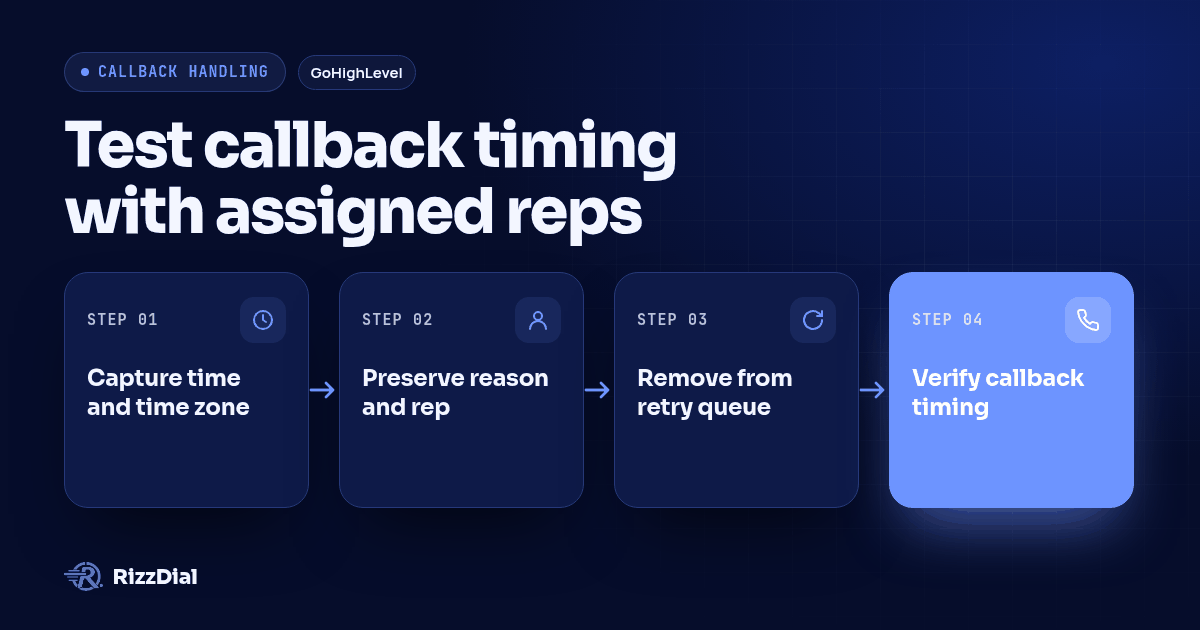
Configure a power dialer to preserve a requested callback as scheduled work with a confirmed time zone, accountable owner and explicit absence rule. Exclude that contact from ordinary retries while the promise is pending, then verify where the callback appears when due and what closes it after the call. For a GoHighLevel agency, approval should depend on a demonstrated calling and CRM workflow, not a callback label alone.
Key takeaways
- Preserve the buyer's timing and reason in the record the calling rep actually sees.
- Test retry exclusion and absent-rep handling before accepting the workflow.
- Require evidence from the dialer and CRM before declaring the callback complete.
Why should callback handling affect your power dialer choice?
A callback promise changes the next action. After an unanswered attempt, your team may choose when to retry. When a buyer asks for a particular time, the next attempt should follow that agreement. A generic cooldown cannot stand in for the requested schedule.
This is a real evaluation question. A buyer in a GoHighLevel community discussion asks for a power dialer that integrates with the CRM; a reply specifically raises callback tasks and follow-up handling. That is evidence of buyer interest, not proof that any recommended product implements those behaviors.
A separate Genesys community question about customer-requested callback times describes a callback entering a queue rather than the intended campaign. It illustrates a useful acceptance question: where does the promise become executable? The older discussion is problem evidence, not current setup guidance.
For a reseller, this distinction belongs in the client handoff. The team needs to know which screen to watch, which person owns an overdue promise and whether another workflow can dial the same contact. Start with the GoHighLevel calling integration overview, then ask for the specific callback path to be demonstrated in the configuration you intend to use.
This guide tests an already valid promise. Requiring a rep to classify every call and removing obsolete Manual Call tasks after a stage change are separate workflow decisions.
How do fixed retries, personal callbacks and shared callbacks compare?
Choose the model according to what the buyer agreed to. The table describes proposed operating models and evidence to request, not a feature matrix for a particular vendor.
| Retry or callback type | Due-time source | Owner | Absent-owner rule to define | Proof of completion |
|---|---|---|---|---|
| Fixed retry | Campaign interval after an attempt | Next eligible campaign rep | Another eligible rep follows campaign rules | Attempt recorded and retry state updated |
| Personal callback | Buyer-requested date and time | Named rep | Hold, approved transfer or supervisor exception | Callback attempt linked to the promise and related work resolved |
| Shared callback | Buyer-requested date and time | Eligible team, with an accountable supervisor | Available teammate accepts; supervisor handles no coverage | Acting rep identified and no duplicate callback left open |
Personal ownership fits a buyer who wants to continue a detailed conversation with the same person. Shared ownership fits a buyer who needs an answer from anyone authorized to give it. Do not silently change a personal promise into a team callback simply because shared routing is convenient.
CloudTalk provides an attributed example of the distinction. Its scheduled callback documentation describes callbacks pinned to a rep and open callbacks available to campaign agents. It also says scheduled contacts leave the current queue and return when due, ahead of retries and fresh contacts. These are CloudTalk's documented behaviors, not assumptions about another dialer.
A due queue item still needs someone to handle it. When a vendor says it supports scheduled callbacks, ask whether that means a reminder, a queue entry, a CRM task or an automatically initiated call. Each requires different staffing and different evidence.
How can you test a promised callback from capture to completion?
Use the following original acceptance procedure in an isolated demo with test contacts and numbers controlled by your team. These are proposed tests, not reported results. Include an ordinary retry contact alongside the callback contact so the demonstration can expose competing work.
Record the expected behavior before starting. Keep the contact reference, callback reference, client account, requested time, rep and actual observations together. Mark an unobserved behavior as unverified rather than assuming a setting proves it works.
Capture the requested time and time zone
Save a complete date and local time, plus the buyer's confirmed time zone. If the buyer says “tomorrow afternoon,” clarify the date and acceptable window before treating it as a precise commitment. Do not infer their current location solely from a phone number.
Use a hypothetical buyer in a different time zone from the rep. Read the saved promise from the buyer's perspective, then inspect how the rep sees it. Ask the demonstrator to show the underlying scheduled value or equivalent record, rather than relying only on a calendar label.
Include a separate case in which the callback date crosses a daylight-saving transition in the selected region. Verify that the system preserves the agreed local time for that date. This is a test requirement, not a claim that a particular product performs the conversion correctly.
Pass condition: the saved schedule has an unambiguous meaning, and the buyer-facing promise agrees with the time used to release the callback.
Preserve the reason and assigned rep
Write why the buyer requested the callback and what the rep needs to bring. For example, a hypothetical note might say that the buyer wants to discuss the revised proposal after speaking with a colleague. Keep the note factual and short enough to use before dialing.
Record whether the buyer requested the original rep or accepted a teammate. Identify the callback owner separately from the account owner if those roles differ. A contact assigned to a salesperson does not, by itself, demonstrate that the callback follows that assignment.
Open the due-work view as the intended recipient. Confirm that the reason, timing and ownership choice are visible there. Repeat with an authorized backup rep so that a successful transfer does not strand the context in the original rep's private notes.
Pass condition: whoever is permitted to call can see the promise and understand why the contact is waiting, without asking someone to reconstruct the conversation.
Remove the lead from ordinary retry eligibility
Require a pending callback to prevent competing ordinary retries for the same calling purpose. Ask the demonstrator to show how the campaign recognizes that hold and which system controls it. A callback note beside an unchanged retry timer is not enough evidence.
Let the ordinary retry condition become due before the promised callback. Observe the queue and call activity using your controlled test number. The callback contact should remain protected while the unrelated retry contact can continue through its normal path.
Inspect other active calling workflows for that test contact. If the CRM and dialer can independently initiate calls, each relevant path needs to honor the pending promise. Use the CRM integrations overview to frame the connection discussion, then require evidence of the actual exclusions in the proposed setup.
Pass condition: ordinary retry processing does not call the contact early or create competing callback work. Document the scope of the hold so it does not accidentally suspend unrelated service work.
Verify the callback becomes due in the right place
Inspect the workflow immediately before and after the scheduled time. Record when the callback becomes eligible, where it appears and which rep can act on it. Then record the actual dial start separately. This distinguishes saved timing from queue delivery and completed action.
CloudTalk says its callbacks appear in the queue without a push notification or pop-up. That documented example shows why an agency should verify the rep's actual work screen instead of assuming a notification exists. See CloudTalk's explanation of when callbacks come due.
Test with other eligible work present and with the assigned rep already occupied. Ask how priority works and what prevents due callbacks from being overlooked. If exact-time dialing is unavailable, make the supported handling window explicit before the client promises it to buyers.
Pass condition: the callback becomes actionable in the agreed location, with visible context and ownership. A correct timestamp hidden on a contact record does not pass this step.
Test absent-rep and overdue cases
Repeat the scenario with the assigned rep outside an active session. Separately test a rep who remains logged in but cannot take the call. The configuration may treat those conditions differently, so do not accept a single absence test as proof of both.
CloudTalk documents an approximately 30-minute hold before a pinned callback opens to other campaign agents when its assigned rep is not in a session. It also describes overdue callbacks surfacing at the next session start. Those details are specific to CloudTalk's scheduled callback policy, not a recommended universal delay.
Choose the client's fallback deliberately: authorized transfer, supervisor intervention or a new agreement with the buyer. Repeat with nobody available, then restart a session after the due time. Keep the original promised time visible so a late callback is not disguised by a fresh timestamp.
Pass condition: overdue work remains visible and accountable. The record identifies who must act next, and fallback behavior respects whether the buyer requested a particular person.
Confirm one completed callback closes the relevant work
Complete the callback to your controlled number and inspect the associated dialer and CRM records. Confirm that the attempt points to the original promise, identifies the acting rep and records what happened. Distinguish a finished attempt from a conversation that actually fulfilled the buyer's request.
If the integration created a companion task, verify that it reaches the intended resolved state. Refresh both views and start another session to check that stale callback eligibility does not create a second call. Do not use a broad “close all tasks” action that could erase unrelated commitments.
Repeat with no answer and with a newly agreed callback time. For no answer, preserve the attempted promise and apply the client's chosen next action. For a new agreement, retain history while ensuring only the current schedule can initiate the next callback.
Pass condition: the relevant work has a clear final or next-action state, with no duplicate pending call for the same promise. A vendor should demonstrate this across the connected workflow, not just inside the dialer.
What evidence should an agency keep before approving the workflow?
Keep a compact acceptance record for each scenario. Include the expected behavior, the observed behavior, the account and contact references, the responsible reviewer and the evidence location. Screenshots should show the relevant saved schedule and work state; activity records should establish what actually happened.
Group findings by what failed. A wrong date is a capture problem. An early competing call is an eligibility problem. A hidden overdue item is a visibility problem. A second call after resolution is a completion problem. This makes the correction specific enough to retest without rerunning unrelated configuration work.
If your workflow includes a text confirming the requested callback, evaluate that as a separate communication step. Beam's GoHighLevel iMessage page is relevant to that messaging layer. A confirmation message should reflect the same saved promise; sending it does not demonstrate that the calling queue will honor the schedule.
For the commercial decision, bring the procedure to a RizzDial demo. Ask to see timing, retry exclusion, ownership fallback and completion in the configuration proposed for your client. Treat behaviors not shown in that demo as unverified, and require a named operator for any manual exception before approving the workflow.
What FAQs do agencies ask about promised callbacks?
Is a callback note enough to keep a promised time?
No. Require a saved date, time zone, owner and executable callback record. Then verify that the record becomes available in the intended queue or task view and that ordinary retries cannot call the contact early. A note supplies context, but the acceptance test must prove scheduling behavior.
Should callbacks stay with the original sales rep?
Keep personal ownership when the buyer requested that rep or the conversation needs their knowledge. Use shared ownership when an authorized teammate can fulfill the promise. In either case, define who handles an absence and require the receiving rep to see the original reason and timing.
Does reaching the callback time mean the phone will ring then?
Treat due time and actual dialing as separate events until the vendor demonstrates otherwise. Inspect when the callback becomes eligible, when an agent receives it and when dialing starts. If the workflow cannot meet the agreed time or window, it needs an explicit exception owner.
What should happen if the buyer does not answer the callback?
Record the attempt without implying that the intended conversation happened. Apply the client's agreed follow-up rule and preserve the original callback history. If another callback is arranged, give it its own current schedule and make sure the previous work cannot generate a duplicate attempt.
How can RizzDial help with your calling workflow?
RizzDial is the AI outbound sales workspace for teams on GoHighLevel. Power dialing, AI voice agents, SMS automation, and CRM workflows in one platform. Book a demo.