AI Voice Agents
AI Answering Service for Roofers: What to Automate First
What an AI answering service should handle for a roofing company during a storm surge, what stays with a person, and how to test it before the storm.
By James Hill, Founder, RizzDial ·
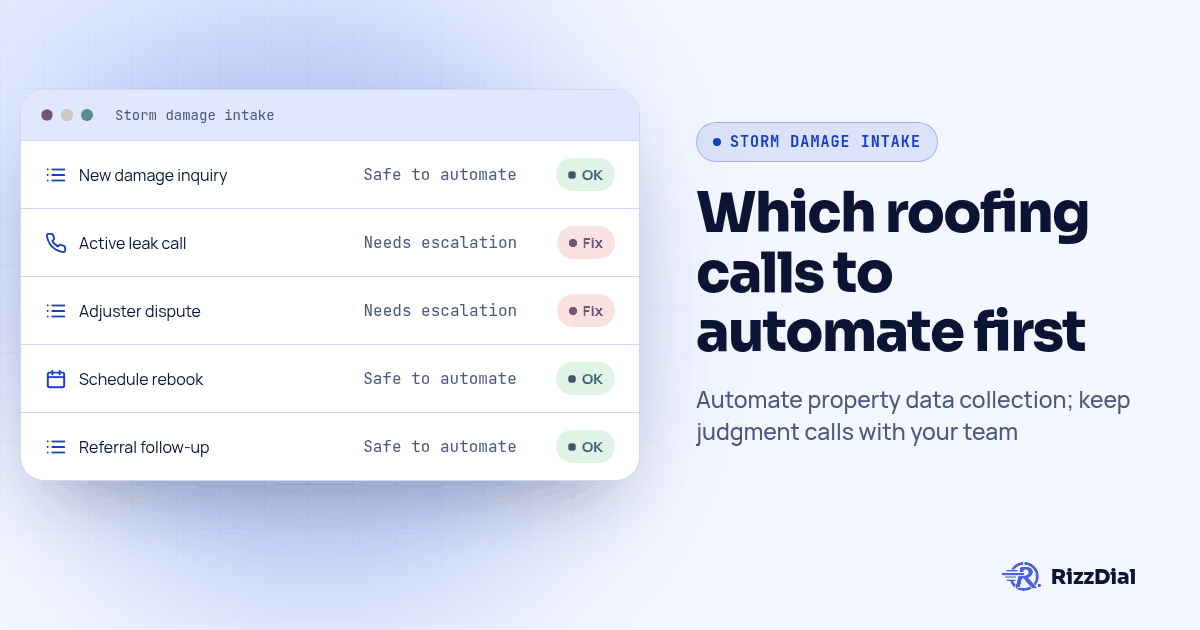
During a storm surge, automate routine intake first: collect the property address, damage description and callback number, then offer an inspection only when the connected calendar confirms availability. It should hand off the moment a caller describes a safety hazard, disputes an insurance decision, or needs a promise about scheduling capacity that only a person can make. Treat the AI as the intake assistant for routine requests and booking, and keep a person on call for anything that requires judgment.
Consider a hypothetical storm afternoon: hail moves through a zip code while several homeowners call your office at once. The crew is still on a ladder finishing yesterday's job, the office line rings through to voicemail, and the homeowner may try another contractor before anyone returns the call. We already covered the outbound side of that problem in our guide to AI dialers for storm damage follow-up, which is about calling homeowners before your competitors do. This piece covers the other direction: what happens when the phone rings first, and which parts of that call an AI should handle alone.
What happens to a roofing company's phone during a storm surge?
Plan for overlapping calls rather than assuming a particular storm will produce a predictable surge. Review your own missed calls, time stamps and unresolved callbacks to establish the coverage gap. A small office may manage ordinary volume but need overflow help while dispatch handles urgent requests. That is a workflow to test, not a forecast of how many leads a storm will bring.
The buyer question is already visible in Trillet's roofing answering-service article, which discusses storm-damage intake. That is evidence of an active vendor use case, not independent proof of conversion gains or search volume. This guide focuses on the acceptance checks a roofing agency can run before promising that workflow to a client.
Which roofing calls are safe to hand to an AI answering service, and which must stay with a person?
Sort incoming calls by what the caller needs decided, not by how the call sounds on the surface. A calm-sounding call can still need a person, and a frantic one can still be routine intake.
Safe for AI: collecting the property address, confirming whether the caller has visible damage or is calling preventively, capturing a working callback number and preferred inspection window, and reading back a confirmation so the homeowner knows the request went through. None of that requires judgment about the roof itself.
Not safe for AI, and not safe for most human receptionists either without a decision from someone who has seen the job: whether a specific insurance adjuster's damage assessment is wrong, whether a tarp needs to go up today because of an active leak, and any promise about which exact day a crew will show up when the schedule is already full. Those calls need the estimator or the owner, and an AI that tries to answer them anyway creates a promise nobody can keep.
| Call type | Can an AI answering service handle it alone? | What a person still has to do |
|---|---|---|
| New storm-damage inquiry, no visible leak | Yes, capture details and book the inspection | Confirm the appointment before the crew arrives |
| Active leak or visible structural concern | No | Call back immediately, decide on an emergency tarp |
| Insurance adjuster scheduling or rescheduling | Yes, reschedule against the existing calendar | Review if the new date conflicts with crew capacity |
| Dispute over an adjuster's damage estimate | No | Estimator reviews the claim and calls the homeowner |
| Referral from a completed job, asking for a second opinion | Yes, capture details, offer the standard inspection slot | None, unless the caller raises a new concern |
| Existing customer asking when the crew is arriving | Partial, confirm the scheduled date if one exists | Office staff checks crew capacity if the date moved |
Keep insurance questions inside a narrow intake boundary: record what the homeowner says and route coverage questions to the insurer or an authorized professional. Do not let the assistant interpret a policy, dispute an adjuster's conclusion or promise payment. Immediate danger needs the business's approved emergency instructions before a transfer or callback; an unanswered roofing line must not be presented as emergency help.
If your team is still deciding between a fully staffed answering service, a fully automated one, or something in between, our procurement framework for human, AI and hybrid coverage walks through how to map that workload before you sign anything.
How do you set up an AI answering service for a storm-day call spike?
Build the setup before storm season starts, not after the first call comes in. Use this proposed sequence with the office manager and the agency configuring the account. Confirm each connection in the actual account before enabling it for callers.
- Write the intake script around five fields only: property address, damage type the caller describes, whether there is an active leak, a working callback number, and preferred inspection window. Resist adding more fields than the office staff currently asks for on a normal call.
- Connect the AI answering service to your scheduling calendar so booked inspections land on the same calendar your dispatcher already uses, instead of a separate list someone has to copy over by hand.
- Confirm the available integration and map the CRM fields the AI will write to, matching the fields your estimators already search by so a new lead looks the same whether a person or the AI took the call.
- Set the overflow rule: calls ring the office line first for a set number of rings, then route to the AI if nobody answers, so a person still gets first chance at every call during normal volume.
- Build the handoff trigger for active leaks or disputed claims, so the AI recognizes those keywords and routes the request to the assigned person using the approved escalation path instead of trying to finish the intake script.
- Turn on a same-day summary, sent to whoever runs dispatch, listing every call the AI took, what it booked, and any call it flagged for a callback.
- Verify number ownership, inbound routing and outbound caller identification with the provider. Test the displayed number on your own devices; do not assume that connecting a number guarantees a business-name display or prevents spam labels.
- Review the first week of transcripts against the five intake fields from step one, and tighten the script wording for anything homeowners consistently misunderstand.
How does an AI answering service compare to a staffed answering service and a missed-call text-back workflow?
Each option solves a different piece of the storm-day problem, and a roofing company can combine them according to its escalation needs.
| What you need | Staffed answering service | AI answering service | Missed-call text-back only |
|---|---|---|---|
| Answers every call during a spike | Depends on contracted staffing and overflow coverage | Depends on configured concurrency and provider capacity | No, it reacts after the call is already missed |
| Books the inspection onto your calendar | Depends on the service's software access | Yes, if connected to your calendar | Can send a booking link; a basic reply alone does not book |
| Handles an active-leak call correctly | Yes, if staff are trained on your escalation rule | Only if the handoff trigger is built and tested | No, it is not a live conversation |
| Consistent intake questions every time | Depends on staff training and turnover | Requires prompt testing and transcript review | Not applicable, no questions are asked |
| Cost model | Confirm staffing and usage terms | RizzDial AI talk time: 6 to 20 cents a minute; seat based options also exist | Confirm messaging and workflow terms |
| Works at 2 AM when a storm hits overnight | Requires overnight coverage | Requires configured overnight routing and escalation | Can reply overnight if enabled; no live voice intake |
A basic missed-call text-back workflow acknowledges the call. It can offer a booking link or invite a reply, but it does not itself collect details in a live voice conversation. Choose based on the next action the homeowner needs, then test that action from start to finish. For appointment confirmations specifically, once the inspection is booked, a text often works better than another phone call. Beam's guide to confirming appointments by text instead of calling covers what that confirmation message should say and how to keep the next step clear.
How do you test the AI answering service before the next storm hits?
Run this procedure before storm season, and again after any change to the script, the calendar connection or the CRM mapping. Do not wait for the first real storm call to find out something broke.
- Call the line yourself and describe a routine storm-damage scenario with no active leak. Confirm the AI collects all five intake fields and books an inspection slot that actually appears on the dispatcher's calendar.
- Call again and describe an active leak. Confirm the AI recognizes the trigger and offers an immediate callback from a named person instead of continuing the standard script.
- Call a third time and ask a question about whether an adjuster's estimate looks fair. Confirm the AI declines to interpret the estimate and instead offers to connect the caller with the estimator.
- Check the CRM record created by each test call. Confirm the address, damage type and callback number all landed in the fields your estimators actually use to search for new leads.
- Check the calendar. Confirm the booked slot from test call one did not land on top of an existing appointment, and that canceling it removes it cleanly from both the AI's view and the dispatcher's.
- Review the same-day summary sent to dispatch. Confirm all three test calls show up, with the active-leak call and the disputed-estimate call both flagged for a human callback.
How does a booked inspection turn into a closed roof instead of a cold lead?
A booking needs a named owner and a follow-up task. If the homeowner is waiting for an adjuster, record the requested callback date instead of enrolling the lead in an indefinite sequence. Stop follow-up when consent is withdrawn, the customer declines or the job closes. Treat any long nurture plan as a configured workflow with explicit exit rules, not a default promise about the product.
If you run ads or have a sales team, RizzDial is our pick. We make RizzDial, so this recommendation comes from the team behind it. Its direct GoHighLevel integration can support fresh form-fill follow-up alongside inbound intake. Power, predictive and parallel dialing let reps work beside AI voice agents, with iMessage follow-up as another configured channel.
RizzDial's proprietary voicemail detection runs in 0.66 milliseconds and is built to connect reps to live humans faster. That figure describes the detection component, not total call connection time. Direct carrier access to AT&T, Verizon and T-Mobile, number rotation and reputation monitoring help teams manage caller reputation; they cannot guarantee removal of spam labels.
Run through these with whoever will own the setup before you sign anything.
- What happens to a call the AI does not understand, and does it fail safely into a human callback or just repeat the question?
- Which CRM fields does the AI write to, and does someone on staff check those fields weekly against what estimators actually search by?
- Who gets the same-day summary of calls the AI took, and what is the plan if nobody reads it during a busy week?
- Does the vendor's pricing scale with call minutes, or does a slow month still cost the same as a storm-surge month?
- Can the intake script be edited by your own office staff, or does every wording change require a support ticket?
What FAQs do roofers ask before buying an AI answering service?
How much does an AI answering service cost for a roofing company?
RizzDial AI talk time costs from 6 to 20 cents a minute, billed for talk time only. RizzDial also has flexible seat based options. The minute range is not a quote for the whole setup; confirm which seats, integrations and support arrangements your proposed workflow includes.
How long does it take to set up an AI answering service before storm season?
Plan on getting the intake script, calendar connection and CRM field mapping tested at least a full week before storm season starts in your region, then run the test-call procedure again after any software update. Waiting until a storm is already in the forecast leaves no room to fix a broken calendar sync or a missed webhook.
Does an AI answering service for roofers integrate with JobNimbus, AccuLynx or GoHighLevel?
RizzDial has a direct GoHighLevel integration and supports custom integrations with a dedicated developer. For JobNimbus or AccuLynx, confirm the available API access, calendar permissions and field mapping with the team before promising a connection. Test creating, updating and canceling a booking in the actual account.
Does an AI answering service have calling hour or consent rules to follow?
Yes. Receiving a homeowner's call is different from initiating an automated outbound call. Before enabling callbacks or reminders, check the call purpose, consent, recipient location, opt-outs and applicable calling hours. An inbound inquiry should not be treated as blanket permission for future automated marketing.
What does it cost to switch from a staffed answering service to an AI one?
Plan for intake-script work, CRM field mapping, testing and staff training. Ask each provider about migration terms rather than assuming there is no fee. Export the call log and script your staffed service already uses, keep the same intake questions during the first storm cycle, and only change the script once you have call recordings to check it against.
How should you prepare the demo and outbound follow-up rules?
The FTC's Telemarketing Sales Rule guide describes calling-time restrictions for covered outbound telemarketing, generally 8 a.m. to 9 p.m. at the recipient's location unless prior consent permits otherwise. Do not apply that window as universal permission: state rules, the call's purpose and consent requirements can change the analysis. Have the responsible compliance reviewer approve outbound rules separately from inbound routing.
Set up the intake script, calendar connection and handoff rule before the next storm. Book a RizzDial demo and bring your five intake fields, an example unavailable slot and an urgent-call scenario. Ask the team to demonstrate the proposed setup and identify any custom integration work before you commit.
How can RizzDial help with your calling workflow?
RizzDial is the AI outbound sales workspace for teams on GoHighLevel. Power dialing, AI voice agents, SMS automation, and CRM workflows in one platform. Book a demo.