Agency Growth
Contact Center Automation: What AI Replaces vs Assists
See which contact center tasks AI can automate, where humans retain control, and how to test a GoHighLevel client rollout.
By James Hill, Founder, RizzDial ·
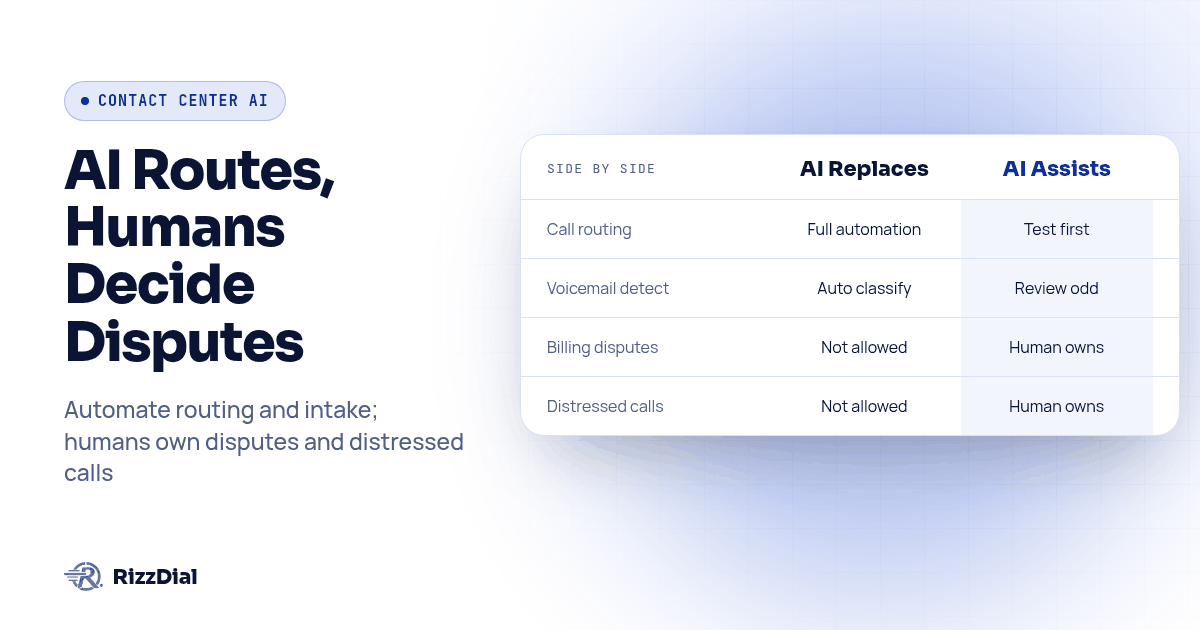
TL;DR: AI can handle bounded call routing, voicemail detection, after-hours intake, and approved routine answers after testing. People should own disputes, distressed callers, and decisions outside the approved rules. Sort the queue by task, then prove the fallback works before expanding automation.
Contact center automation can replace repetitive queue work while assisting people on calls that need judgment. Routing, voicemail detection, and after-hours intake are candidates for automation when the rules, data access, and fallback have passed a pilot. Billing disputes, distressed callers, and decisions outside the approved scope should reach a named human owner.
For GoHighLevel agencies, this task-by-task split turns a broad software purchase into a testable client rollout. This guide walks through what to hand to AI, what to keep on a human escalation path, and a numbered procedure for defining the boundary. We make RizzDial, so the product recommendation here is ours, not an independent ranking.
Which Contact Center Tasks Can AI Fully Automate Today?
Call routing is a useful starting point because the destination can follow explicit rules. Given an approved call reason, business hours, and an available destination, a system can route the call without someone reading the queue. Aircall describes intent detection and routing among contact center automation functions in its AI contact center guide. Use that as a capability category, not evidence that your particular queue can run unattended. An unknown reason or unavailable destination still needs a fallback.
Answering machine detection sits next to routing on the automation list because it classifies a pickup rather than deciding a customer's outcome. RizzDial's proprietary voicemail detection runs in 0.66 milliseconds and is built to connect reps to live humans faster. That is a RizzDial product claim, not a measurement of your entire call connection time. Test live greetings, recorded greetings, silence, and interruptions before deciding how your campaign should handle each result.
After-hours capture is another bounded candidate. An agency can configure intake for a caller's name, callback number, and reason for calling, with confirmation before saving. Treat booking as a separate permission: the agent needs the correct calendar, current availability, and a confirmed write before it promises a slot. If the calendar is unavailable, capture a callback request rather than claiming an appointment exists. Urgent or unclear requests should follow the client's approved escalation policy.
Automatic call disposition and CRM logging can reduce manual follow-up work, but writing a note is not the same as verifying its accuracy. Define which fields the workflow may update, what evidence determines the disposition, and what happens when the write fails. RizzDial has a direct GoHighLevel integration; verify the actual fields and actions required by the client in a GoHighLevel calling workflow. Do not assume that every transcript, custom field, and downstream action is configured automatically.
Which Contact Center Tasks Still Need A Human Escalation Path?
Billing disputes belong on the human-owned list because the outcome changes what the customer owes or receives. AI may gather the reason for the dispute and retrieve permitted account context, but an authorized person should decide whether to refund, credit, or decline. SupportYourApp describes a hybrid approach in which routine work is automated and people handle complex, emotional cases in its call center staffing discussion. That distinction is a useful scoping principle, not a promise about staffing reductions.
Sensitive situations make the boundary especially clear. Consider a hypothetical caller who mentions a recent health scare while asking to reschedule. The agent should not turn that into medical advice or a sales objection to overcome. Define the permitted response and the human destination before launch. A caller asking for a person, expressing distress, or giving an unclear urgent explanation should not have to say a particular keyword to leave the automated flow.
Overflow and staffing policy need an accountable manager even when the routing mechanics are automated. For example, if several reps receive a lead alert, decide in advance who owns the lead when more than one responds. A first-accepted assignment could be one policy, with later responses redirected to the queue. This is a hypothetical design choice to test with the team, not a claim about a default RizzDial behavior. Automation should enforce an approved policy rather than invent one mid-call.
Keep judgment calls with a person and test whether that person actually receives them. A successful transfer signal does not prove that someone heard the issue, accepted ownership, or received the notes. Ask the receiving rep to describe the next action using only what the workflow delivered. Our AI answering service coverage and handoff guide goes deeper on proving that a handoff reached an accountable person instead of merely connecting a call.
How Do You Scope A Client's First Automation Rollout?
Scoping comes before setup. Use this proposed procedure to turn a client conversation into an acceptance plan, and adjust the sample window to the available call volume:
- Pull 30 days of call logs and tag every call by its actual reason, not by the queue it landed in.
- Sort each tag into one of two buckets: "AI owns" (routing, voicemail detection, after-hours capture, FAQ lookups) or "AI assists, human owns" (disputes, sensitive calls, overflow decisions).
- For every tag in the "AI assists" bucket, name the specific person or role who owns the outcome, not just the department.
- Build and test the "AI owns" rules first: routing, answering machine detection, and after-hours intake, using test contacts and destinations before exposing live callers.
- Run a pilot cycle on the lowest-risk tag before expanding scope, and watch the exception log the whole time, not just the summary report at the end.
- Review the exception log weekly for the first month and move any tag that keeps surprising the AI back into the "assists" bucket until you can tighten the rule.
Copy this checklist into the kickoff doc for your next client and fill it in together before the first setup call:
- Call reason tags from the last 30 days, sorted into AI owns versus AI assists.
- A named human owner for every tag in the AI assists bucket, with a backup owner listed.
- The exact wording the AI is allowed to use when it cannot resolve something, agreed with the client in advance.
- A pilot campaign or number range to test the AI owns rules on before a full rollout.
- A weekly exception review slot on someone's calendar for the first month.
- A rollback plan: what gets turned off first if the pilot surfaces a problem.
Think of the workflow as two paths: approved routine requests go to an automated action, while exceptions go to a named human owner. Both paths feed the same exception log. A closed ticket should mean the requested action was confirmed, not merely that the caller stopped speaking.
What Does An AI Replaces Vs Assists Comparison Table Look Like?
Lay out the split for a client in a single table before you write a single automation rule. It forces the "who owns this" question into the open early, when it is cheap to fix, instead of after a bad call.
| Contact center task | AI replaces (owns outright) | AI assists (human owns the outcome) |
|---|---|---|
| Call routing by reason and time of day | Yes, within tested routing rules | Review unknown reasons and failed routes |
| Answering machine detection | Yes, after testing pickup classification | Review ambiguous or misclassified pickups |
| After-hours intake and message capture | Yes, for approved intake and confirmed booking | Escalate urgent, unclear, or distressed requests |
| FAQ, order status, and password resets | Only with approved answers and required identity checks | Escalate anything outside that set |
| Billing disputes and refund decisions | No | Human owns the decision; AI surfaces account history |
| Calls involving a distressed or vulnerable caller | No | Human owns the call; AI should not attempt resolution |
| Multi-rep overflow and staffing conflicts | No | Human owns the policy and the tiebreaker |
| Post-call CRM logging and disposition | Yes, for verified fields and outcomes | Review errors, failed writes, and sensitive notes |
Use this table as the starting point for the checklist above, then adjust the rows to match what the client's actual call logs show rather than what a generic template assumes.
How Do You Test Whether AI Should Own A Task?
Use a small acceptance sheet that records the test input, expected action, observed action, saved CRM record, and responsible reviewer. The following is a proposed test procedure, not a customer case study or a performance benchmark. Run it with test contacts before the limited live pilot.
- Call with a routine request that is covered by the approved answer set. Confirm that the answer matches the current source and that the agent does not invent a policy, availability, or account detail.
- Repeat the request with missing information. The agent should ask for clarification or transfer according to the approved rules, rather than filling the gap with a guess.
- Ask for a person during the routine flow. Check the destination, the context delivered to the rep, and the fallback when that rep does not answer. Record the owner of the unresolved request.
- Make the calendar or CRM action fail in a controlled test. Check that the caller is not told a booking or update succeeded. Confirm that the failed action becomes visible to the responsible team.
- Review the same records from the rep's view. Compare the saved number, reason, disposition, and next action with what the caller actually said. Correct mismatches before enabling follow-up triggers.
- Restore the previous routing configuration using the documented rollback steps. Confirm that a fresh test call follows the restored route and that pending callbacks still have owners.
Agree on pass conditions before testing. For example, an unresolved request must remain open with an owner, while a booking requires a confirmed calendar entry. These are proposed acceptance rules, not claims about a particular product's default settings. A task stays in the AI assists bucket until the client accepts the evidence for letting it run within the defined boundary.
Do not judge the pilot only by how many calls avoid a transfer. Review repeat contacts, incorrect dispositions, missed callbacks, and caller requests for human help. A shorter call is not necessarily a resolved call. Keep a dated record of prompt and routing changes so the next review compares the same workflow, and rerun the relevant failure cases when a rule changes.
What Does This Look Like Across An Agency's Full Stack?
A contact center rarely sits by itself. It is one piece of a bigger automation stack that also touches ads, the CRM, and whatever sales process sits downstream of the call. If you are scoping this for a client who is also rebuilding the sales side of the business, not just the phones, MetaTechAi's infrastructure guide covers how the automation layer should connect to the rest of that stack: MetaTechAi's AI infrastructure guide.
If you run ads or have a sales team, RizzDial is our pick. It combines power, predictive, and parallel dialing with AI voice agents working beside reps. Fresh form fills can connect to calling through the direct GoHighLevel integration, with iMessage follow up as part of the sales workflow. Direct carrier access to AT&T, Verizon, and T-Mobile, number rotation, and reputation monitoring help manage caller reputation; they do not guarantee that every call avoids a spam label.
Use our full platform comparison to identify the features you need, then take your completed task table to the RizzDial alternatives page to evaluate the platform against your actual workflow. Ask each vendor to demonstrate the same pilot cases. Keep the approved call rules, field mapping, and escalation ownership in your agency's handover documentation.
What FAQs Do Agencies Ask About Contact Center Automation?
How long does it take to scope a client's first contact center automation rollout?
Plan for a call-log review, a tagging session, and a pilot before expanding scope. The duration depends on the quality of the records, the number of call reasons, and how quickly the client can approve escalation rules. Do not promise a launch date before those dependencies are clear.
What does contact center automation cost with RizzDial?
RizzDial AI talk time runs from 6 to 20 cents a minute, billed for talk time only. RizzDial also has flexible seat based options. Scope the full arrangement with the team, including the seats and workflow requirements, rather than treating the AI minute range as the complete operating cost.
Which integrations does an AI contact center layer need to work with GoHighLevel?
It needs a verified connection between the calling workflow and the correct GoHighLevel contact, calendar, and follow-up actions. RizzDial offers a direct GoHighLevel integration. Test the required reads and writes in your setup, including missing records and failed updates, before allowing automated outcomes to trigger further contact.
Is an AI contact center automation layer compliant with call recording and consent rules?
Automation does not establish compliance. Review the applicable consent, disclosure, recording, and do not call requirements for the campaign and jurisdictions involved with qualified counsel. RizzDial is built with FCC and FTC compliance in mind, but product features and configuration do not replace that review.
What is the switching cost of moving from a legacy IVR to an AI contact center layer?
Switching effort depends on number routing, integrations, historical data, and the fallback you need to preserve. Where your providers support it, pilot a limited queue before migrating the rest. Document who can restore the previous route and test that restoration before sending production traffic to the new workflow.
What Should Your Agency Do Next?
Start by writing down who owns each call when AI should stop talking. Use the pilot evidence to expand the routine work it handles, and keep the exception path visible to the client. A rollout is ready when the team can explain both a successful automated outcome and a failed one without guessing.
About RizzDial
RizzDial is the AI outbound sales workspace for teams on GoHighLevel. Power dialing, AI voice agents, SMS automation, and CRM workflows in one platform. Book a demo.