GoHighLevel
Remove Stale GoHighLevel Power Dialer Tasks
Separate workflow removal, pending Manual Call tasks and filtered dialer views. Test stage changes and verify cleanup before approving a client workflow.
By James Hill, Founder, RizzDial ·
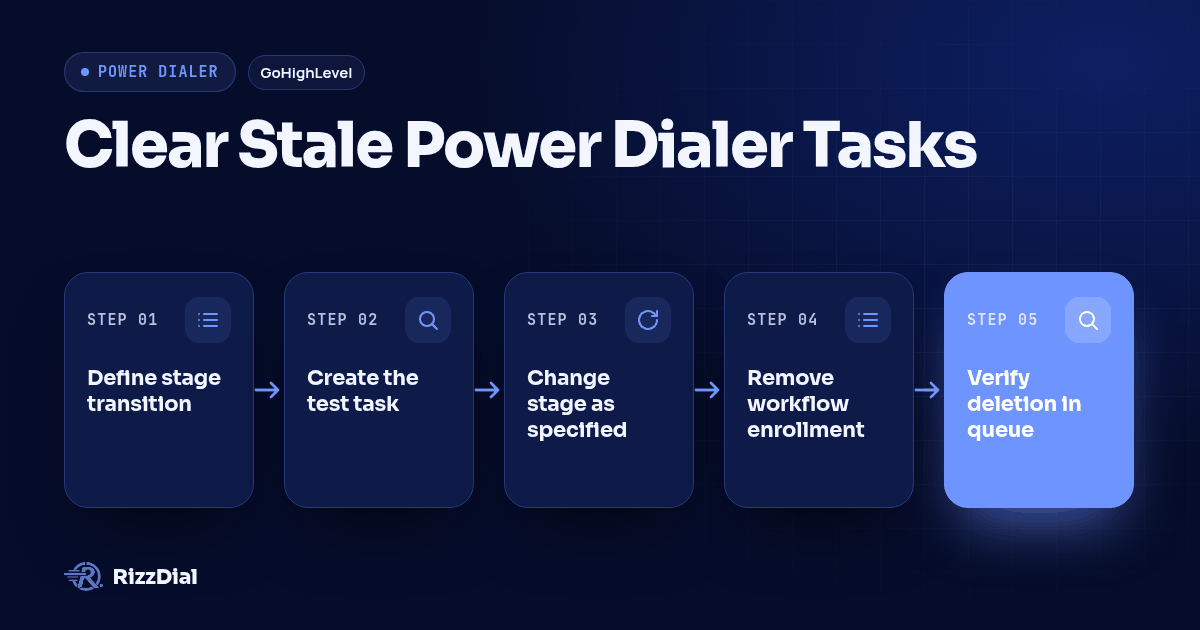
To clear an obsolete pending call, inspect the exact item in Conversations > Manual Actions and use its documented manual deletion control after reviewing the workflow consequences. Treat workflow removal and disappearance from a filtered dialer list as separate observations that require verification. HighLevel documents task deletion as advancing the Manual Call action, so review what follows before clearing it. (HighLevel Manual Call documentation.)
Key takeaways
- Track workflow enrollment, the stored call task and the displayed list separately.
- Inspect the queue without display filters before declaring cleanup complete.
- Require a controlled demonstration before promising automatic removal to clients.
Why are resellers asking how to remove pending dialer tasks?
The buyer problem is specific: a call becomes unnecessary after the opportunity changes stage, but staff may still encounter the old task. A public GoHighLevel question describes stage X creating a Manual Call task, stage Y making it obsolete and workflow removal apparently leaving it in Manual Actions. The author also describes another account where a contact disappears from the dialer, without access to the configuration explaining why. (Buyer discussion.)
A separate HighLevel feature request asks for removal from the Manual Call queue. At review, the request is marked under review; comments include conflicting accounts of workflow removal. This establishes demand for a reliable cleanup method, not a released automation feature. (Remove From Manual Call Action request.)
For a reseller, the acceptance question is whether the obsolete item remains available to operators. A successful-looking screen change does not explain which object changed. The client needs a process that identifies the original task, records why it became obsolete and verifies its resolution.
This guide addresses an unattempted call after a stage change. If a call already happened and its business outcome is missing, use the separate power dialer call disposition checks. Do not record a successful conversation merely to clear an administrative obligation.
How do workflow enrollment, stored tasks and filtered views compare?
Use separate evidence for each state. Workflow enrollment describes participation in an automation. The pending task represents work awaiting an operator. The dialer view is the list that operator currently sees. These distinctions form the proposed audit model below; they are not a claim about undocumented database structures.
| Control or observation | State being examined | What it establishes | What still needs checking |
|---|---|---|---|
| Remove from Workflow | Contact enrollment in the selected workflow | Whether that enrollment ended | Whether the existing Manual Call item remains |
| Exclusion from a filtered dialer list | Current display and its selection criteria | Whether the contact appears in that view | Whether another view still exposes the pending task |
| Explicit deletion in Manual Actions | The selected stored call task | Whether that exact item was removed through the documented control | Workflow consequences and any separate or recreated items |
HighLevel documents Remove from Workflow as removing contacts from selected workflows, with choices covering the current workflow, another workflow or broader enrollment removal. Select the scope that matches the obsolete sequence and verify it in the account. The documentation does not establish deletion of an existing Manual Call item. (Workflow removal documentation.)
A filtered view can be useful for organizing work, but the approval standard should depend on the stored item. If the item remains when display filters are cleared, record it as unresolved cleanup even when the normal calling screen looks correct. If access restrictions prevent a complete inspection, record the result as unverified and involve an authorized account administrator.
Avoid the vague signoff “the contact is gone.” Specify the object: enrollment ended, contact absent from this view, or original task no longer present after deletion. That wording lets another operator reproduce the check.
What does the documented Manual Call action actually do?
The Manual Call action creates a task in Conversations > Manual Actions. HighLevel says the action progresses when that task is explicitly deleted; calling from another area does not complete this step. Its setup guide describes deletion after completing the call. (Manual Call behavior.)
For an obsolete call, our recommended procedure is to document the cancellation reason, review enrollment and downstream actions, then have an authorized operator apply and verify the deletion control. This is an operational recommendation for handling stale work, not vendor documentation of automatic cancellation on stage change.
Keep the contact and opportunity intact during this test. The aim is to resolve a particular pending obligation while preserving the business record. If a proposed fix changes other records, have the implementer explain why that broader change is necessary before accepting it.
What numbered test proves that the pending task was cleared?
Run this original proposed procedure in an isolated test account with a controlled contact. It has not been executed for this article, and no results are claimed. Use harmless downstream actions and keep the test contact out of active calling sessions. Record expected behavior before starting so an unexpected screen change cannot become the definition of success.
Define the stage transition and cancellation rule. Create a hypothetical opportunity with stages called Call Needed and Handled Elsewhere. State that moving to Handled Elsewhere makes this particular call obsolete. Record the client account, contact, opportunity, workflow and reviewer. Specify which other activities should remain valid, such as an independently booked appointment, so cleanup has a clear boundary.
Create and identify the controlled task. Enroll the test contact through the intended entry path and allow the Manual Call action to create its item. Capture the workflow execution record and inspect Manual Actions. Record any available task reference, action name, contact reference and creation time. Do not invent a task identifier if the interface does not expose one; use enough visible evidence to distinguish the item from another pending call.
Record the initial states independently. Inspect enrollment, the pending item and the operator's normal dialer view. Save the view's available filter settings and the inspecting user's role. Confirm that the person checking the queue can access the relevant contact. A missing item at this stage means the baseline is incomplete. Resolve that before attempting to prove its later removal.
Change the opportunity stage without calling. Move the controlled opportunity to Handled Elsewhere. Record the change and inspect the normal list again. Do not edit filters, delete tasks or alter enrollment manually during this observation. If an existing automation reacts to the stage change, record that reaction. This keeps the stage event separate from the cleanup action you will test next.
Test removal from the intended workflow. Apply the configured removal path and confirm which enrollment ended. If stage-change automation already removed it, inspect that execution instead of treating a repeated removal as fresh evidence. Do not broaden the action to unrelated workflows just to make the screen look clear. Note any mismatch between the requested scope and observed enrollment state.
Inspect Manual Actions with display filters cleared. Search for the original controlled item in the same account. Remove any applicable view restrictions offered by the interface and check other pages of results if needed. Have an authorized administrator resolve visibility doubts. If the item remains, record “enrollment removed; task still pending.” If absent, record the observations and investigate which action caused that absence before crediting automatic cleanup.
Apply approved cleanup to any remaining item. Review what follows the Manual Call step and whether the relevant enrollment is still active. Have the authorized operator delete only the identified stale item using the Manual Actions control. Record the reason as obsolete after stage change, without implying a call occurred. Reopen the queue and inspect workflow history for unexpected continuation. HighLevel documents deletion as a progression event. (Deletion behavior.)
Repeat the visibility check and reconcile the result. Revisit the normal filtered list and the broader queue, then ask another authorized staff member to inspect the controlled record. Look for a newly created item as well as the original one. Repeat with a fresh fixture if the first run combined several automatic actions. Approve only when the recorded evidence explains task resolution and the resulting workflow state.
Retain a compact test record: expected result, observed enrollment, observed task, view settings, cleanup action, subsequent behavior and reviewer. Screenshots help explain the sequence, but an empty screen by itself is incomplete evidence. The record should let a colleague tell the difference between deletion, restricted visibility and an unresolved finding.
What should happen if automatic cleanup cannot be demonstrated?
Use an owned manual exception process while the implementation remains unresolved. Give a named operator responsibility for reviewing stage changes that invalidate pending calls. Define when the review happens relative to the next calling session and who takes over if that operator is unavailable.
The review instruction should identify the original item and the reason it is obsolete. Require the operator to check the current opportunity before cleanup, since the business situation may have changed again. Keep unresolved items on the review list until task resolution is verified.
Build prevention into the proposed design as well. Ask whether eligibility can be checked immediately before task creation and whether repeated stage entry can create additional work. These are configuration questions to test in the client account. An earlier eligibility check does not answer what happens when the opportunity changes after the task already exists.
When a stage moves back to Call Needed, decide whether the client wants a fresh call obligation. Treat that as a new business decision with its own reason. Do not restore old pending work merely because the opportunity revisits a familiar stage.
For teams seeking help owning these checks, MetaTechAi managed services provides a context for scoping workflow configuration, monitoring and exception handling. Put responsibility for stale-call review explicitly in the agreed service scope.
What should an integration demonstration prove?
Start with the GoHighLevel calling integration and bring the controlled scenario to the demonstration. Ask the implementer to show the queue that actually supplies calls, where stage changes are observed and which component owns cancellation. Keep the acceptance requirement tied to the obsolete task you created.
For proposed CRM and workflow integrations, require the exact object and operation to be identified. An endpoint described as deleting a task is insufficient unless current vendor documentation establishes that it applies to the Manual Call item in question. Do not adopt guessed webhook event names or API routes from discussion comments.
A useful demonstration should also expose failure handling. Ask what happens when a stage change arrives late, the integration cannot complete an operation or a retry occurs after cleanup. Have the implementer reproduce supported failure cases with controlled records and show how an operator finds the unresolved work. These are evaluation requirements, not assertions that a particular connector already implements them.
Ask for evidence from both systems when a connected dialer maintains its own calling list. A removed entry in one product does not explain the state of another product's queue. This guide does not establish automatic removal of HighLevel Manual Call tasks by a connected calling platform.
The handover should identify the demonstrated path, account configuration, cleanup owner and unresolved limitations. Accept a manual process when it meets the client's operating needs. Accept automatic removal only after the intended object, observable result and recovery process have all been demonstrated.
What FAQ answers help resellers verify pending-task cleanup?
Does removing a contact from a workflow prove the pending call task is gone?
No. Record workflow removal and inspect the pending task separately. Approve cleanup only after an authorized reviewer checks the original item in Manual Actions with display filters cleared.
Can a contact disappear from a dialer list without its task being deleted?
Treat disappearance as inconclusive until you inspect the underlying queue. Compare the filtered view with an authorized view of Manual Actions, then record whether the original item remains.
Can a generic task deletion API clear a Manual Call item?
Do not assume it can. Require current vendor documentation identifying the supported object and operation, followed by a controlled test against the specific Manual Call item. A forum suggestion is insufficient evidence.
What should a reseller promise before automatic cleanup is verified?
Promise only the demonstrated operating process: review obsolete items, assign an authorized cleanup owner and verify resolution. Keep automatic removal outside the accepted scope until its behavior and failure handling have been tested.
For related workflow acceptance checks, review the GoHighLevel voice AI guide before approving the client setup.
How can RizzDial help with your calling workflow?
RizzDial is the AI outbound sales workspace for teams on GoHighLevel. Power dialing, AI voice agents, SMS automation, and CRM workflows in one platform. Book a demo.