Developers
Give Any AI Agent a Phone Number Over MCP or REST
Search numbers by area code, assign one to a custom AI agent, and place a test call with RizzDial's REST API or MCP server.
By James Hill, Founder, RizzDial ·
Every guide we have published so far about connecting an AI agent to a phone number assumes you are plugging in a tool somebody else built: Claude Code, Cursor, the ChatGPT desktop app, Grok. Good guides, wrong audience if what you actually built is your own agent, in your own code, with no vendor CLI to run a connect command in. This one is for that developer: here is exactly how to search for a number by area code, assign it, and place a test call, using either RizzDial's REST API directly or its MCP server from whatever MCP client your stack already has.
Give Your AI Agent a Phone covers the named-tool setups if one of those happens to fit. This page covers the generic case underneath all of them.
What do you actually need before a custom agent can make a call?
Three things, and all three exist independently of which language or framework your agent runs on.
An agent is the thing that talks on the call, defined by a prompt and whatever voice settings you configured for it in RizzDial. A phone number is a resource you search for, buy, and assign, separate from the agent itself, which is why an agent with zero numbers assigned exists happily until the moment you try to dial out of it. And a call trigger is the specific request that turns "this agent could call someone" into a phone actually ringing.
Miss any one of the three and the failure looks different. No agent means nothing to assign a number to. No number means the agent exists but cannot dial out, a state the RizzDial API returns as a plain error rather than a silent no-op. No correct call trigger means you dialed the wrong endpoint, or sent a number that is not in E.164 format, or called an endpoint meant for an agent that is not the one you configured.
Should your agent connect over MCP or call the REST API directly?
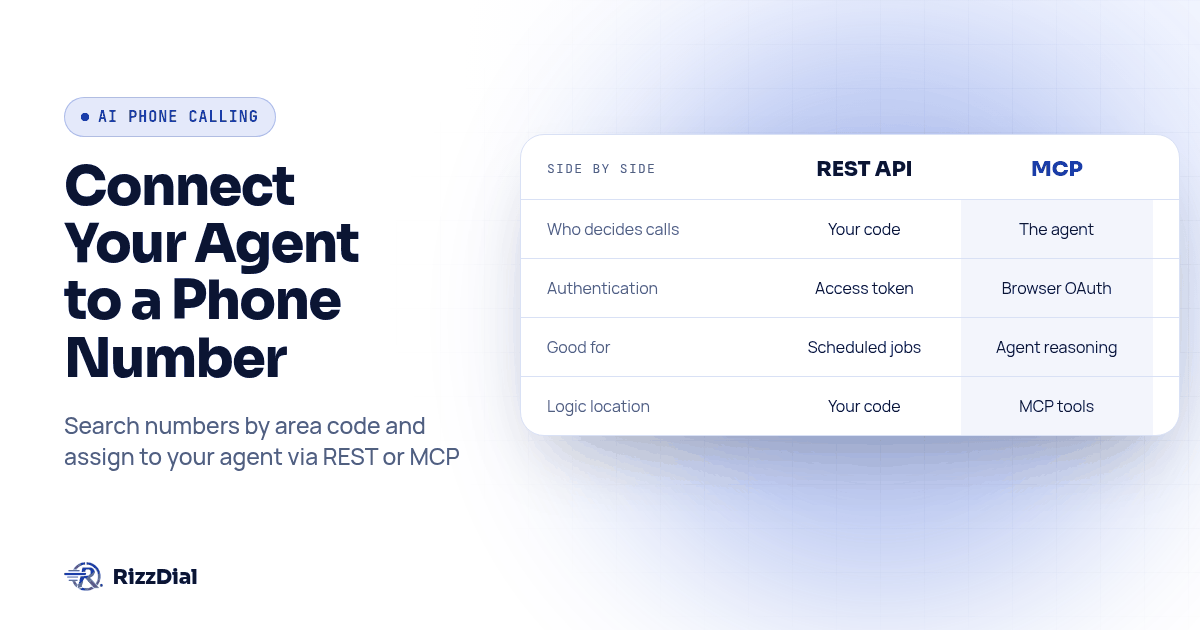
Both reach the same account and the same underlying actions. The difference is who decides which call to make and when.
| REST API | MCP | |
|---|---|---|
| Who picks the next call | Your code, every time | Your agent's own reasoning, at runtime |
| Auth | Personal access token or OAuth 2.0 in a header | Browser OAuth sign in, or a bearer token where OAuth is not available |
| Fits well when | It is a scheduled job, a product feature, anything that should behave the same way twice | Your agent is already deciding what to do next and should be able to reach for a phone number the same way it reaches for any other tool |
| Where the logic lives | In your repository | In the MCP server's tool descriptions, read by your agent at call time |
If your agent is a loop you wrote, one that reads a request and decides what to do next using its own model calls, MCP is usually the better fit, because you are already letting it choose actions, and adding phone tools to that list is more natural than hand coding every REST call it might need. If your agent is closer to a deterministic pipeline, a webhook handler, a cron job, a feature inside a product you are shipping, call the REST endpoints directly and skip MCP. You lose nothing by doing both: explore an account's capabilities over MCP first, then write the exact REST calls your production agent needs once you know what they are.
Diagram: a split flowchart. Left side, labeled "Your custom agent," branches into two paths: one arrow to a box labeled "REST call with bearer token" and another to a box labeled "MCP tool call over OAuth." Both arrows converge on a single box labeled "RizzDial account," which fans out to three result boxes: "number searched," "number assigned," "call placed."
How do you authenticate a custom agent against RizzDial?
The two paths authenticate differently, and mixing them up is the single most common setup mistake.
For REST, open Profile, then Settings, then Personal Access Tokens, inside your RizzDial dashboard, and create a token. Tokens can be set to expire or to never expire. Send it as a bearer header on every request:
Authorization: Bearer YOUR_TOKEN
For MCP, there is no token to copy by hand. Open the MCP page (Connect MCP) in your dashboard, which shows the server URL for your account. Point your agent's MCP client at that URL and complete a one time browser sign in, the same OAuth approval a named chat tool would go through. From then on, that connection acts with the permissions of whichever RizzDial account you approved it against. Any MCP client that speaks HTTP with OAuth works here, not just the clients with their own named setup guide; the server does not check which product is asking.
Neither method cares what your agent is built in. A Python script with requests, a Go service, a Node worker, a shell script with curl, all authenticate against REST the same way. Any MCP SDK in any language authenticates against MCP the same way.
How do you search, buy and assign a number to your agent?
This is the procedure, start to finish, whether you are calling REST by hand or having an MCP-connected agent call the equivalent tools.
- Confirm the agent exists.
GET /api/ai/agent/listreturns your agents with their ids. If you have not created one yet,POST /api/ai/agent/createwith anagent_nameand ageneral_promptmakes one. Note theagent_idyou will use in every later step. - Search for a number in the area code you want.
GET /api/ai/number/searchtakesarea_code,provider, andsearch_by. A search in area code 312, for example, returns a list of buyable numbers, each with aphone_token. - Buy the number.
POST /api/ai/number/purchasewith that exactphone_token, aprovider, and anickname. The response includes anumber_id, a base64 string you should pass through untouched rather than decode or reformat. - Assign the number to the agent.
POST /api/ai/number/assignwithnumber_id,agent_id, and atypeofoutboundorinbound. An agent can hold more than one number; a number cannot serve two agents at once in the same direction. - Fetch the agent's call endpoint.
GET /api/ai/agent/call-endpoint?agent_id=YOUR_AGENT_IDreturns a per-agent URL under/webhooks/ai/create-phone-call/. Treat that returned URL exactly like a password: the token inside the path is the credential, so never log it and never ship it in client-side code. - POST a test call to that endpoint. Send
phone_numberin E.164 format, pluscall_modeset tooutbound. No bearer header is needed on this specific request, because the URL itself carries the authorization. - Read the response. A success looks like
{"status": "success", "msg": "successfully make a call.", "call_id": "..."}. Save thecall_id. - Check call history to confirm the call actually happened.
GET /api/ai/call-historyfiltered byagent_idreturnscall_duration,call_summary,call_transcript,hangup_reason, andcall_successfulfor that call.
A quick curl version of steps 2 through 6, with placeholders standing in for real values:
curl -s "https://app.rizzdial.com/api/ai/number/search?area_code=312&provider=Twilio&search_by=AreaCode" \
  -H "Authorization: Bearer $RIZZDIAL_TOKEN"

curl -s -X POST "https://app.rizzdial.com/api/ai/number/purchase" \
  -H "Authorization: Bearer $RIZZDIAL_TOKEN" -H "Content-Type: application/json" \
  -d '{"phone_token":"TOKEN_FROM_SEARCH","provider":"Twilio","nickname":"test-line"}'

curl -s -X POST "https://app.rizzdial.com/api/ai/number/assign" \
  -H "Authorization: Bearer $RIZZDIAL_TOKEN" -H "Content-Type: application/json" \
  -d '{"number_id":"ID_FROM_PURCHASE","agent_id":"YOUR_AGENT_ID","type":"outbound"}'
Over MCP, an agent connected through the dashboard URL reaches the same actions as tool calls instead of HTTP requests: it would call a search-numbers tool, then an assign-number tool, in response to a plain instruction like "find me a number in area code 312 and assign it to the Renewals agent." The underlying account state changes exactly the same way either path gets there, and the full field list and every endpoint behind these steps is documented in the OpenAPI 3.0.3 spec at https://app.rizzdial.com/api/docs/spec, with a browsable Swagger UI at https://app.rizzdial.com/api/docs.
How do you place a test call and confirm the number actually works?
Buying and assigning a number proves the API accepted your requests. It does not prove a phone rings. Run this test before you point anything at a real customer.
- Call the agent's call endpoint with your own cell number as
phone_number, in E.164 format, so a mistake rings you instead of a stranger. - Confirm the call actually connects, not just that the HTTP response was 200. A
successstatus from the call endpoint means RizzDial accepted the request to dial, not that the call was answered. - Note the
call_idfrom that response. - Wait for the call to finish, then pull
GET /api/ai/call-historyfiltered by thatagent_idand today's date. - Check
call_successful,hangup_reason, andcall_durationon the matching record. A short duration with a hangup reason pointing at the caller is a different failure than a short duration pointing at the agent's own prompt or voice settings. - Listen to the recording or read the transcript if the agent's behavior, not just the connection, is what you are testing.
- Repeat the same test from a second, different phone, ideally on a different carrier, before calling the setup done. A number that rings fine on one carrier and gets marked Spam Likely on another is a real failure mode for freshly provisioned numbers, not a hypothetical one.
RizzDial places calls through direct carrier access to AT&T, Verizon, and T-Mobile rather than routing solely through a generic VOIP trunk, which is part of why a freshly assigned number tends to ring as an ordinary call on the recipient's phone instead of arriving flagged. That does not replace the second-carrier test above; it is a reason the test is worth running rather than skipping.
What should your agent check before it ever calls a real customer?
An agent that can place a test call to your own phone can also, with the same credentials, call a list of real customers. Build these checks in before that happens, not after.
Consent, checked in your own code, not assumed from the API accepting the request. The call endpoint will dial whatever E.164 number you send it. Whether you had the right to call that number is a question your agent has to answer before it calls place_call, using whatever consent record your business already keeps.
A confirmation step for anything that is not a test. If your agent decides who to call based on a prompt rather than a fixed list, add an explicit approval gate around the actual dial, the same way you would gate a delete or a purchase. A declined call should be a clean no-op your agent can explain, not a retry loop.
Do-not-call status, honored at the contact level. A contact marked do not call in RizzDial stays marked that way no matter what triggered the attempt to call them, whether that is a campaign, a webhook, or your own script.
TCPA consent for AI-generated voices specifically. A February 2024 FCC declaratory ruling held that AI generated voices count as artificial voices under the Telephone Consumer Protection Act, which means prior express consent rules that already apply to robocalls apply here too; see the ruling at fcc.gov. None of this is legal advice, and no API response can tell your agent whether a given call is one it is actually allowed to make.
What questions do developers ask before connecting a custom agent to RizzDial?
Do I need to build my agent in a specific language or framework to connect it to RizzDial?
No. The REST API is plain HTTP with a bearer token, so anything that can send a request, Python, Node, Go, a shell script, works. The MCP server speaks the Model Context Protocol over HTTP, so any MCP client library in any language can drive it the same way a named chat tool does.
How much does it cost to give a custom agent a phone number through RizzDial?
RizzDial is pay as you go for AI talk time, from $0.06 to $0.20 per minute, billed only for the minutes an agent is actually on a live call, plus flexible seat based options. Ask the team about any account or number setup details when you discuss access.
How long does it take to go from nothing to a working test call?
The setup sequence is to create a personal access token, confirm an agent exists, search and assign a number, then call the agent's call endpoint. The time depends on your account access, agent configuration, and how much of the sequence your code already handles. Plan to write your own retry and logging code around the calls.
What happens if my agent tries to place a call before a number is assigned?
The call endpoint returns an error instead of dialing. The most common failures are an agent with no outbound number assigned, an agent that is not active, and an account balance too low to cover the call. Check for each of those cases in your error handling, not just a generic failure.
Is it legal for my custom agent to place outbound calls on its own?
The calls are regulated the same as any other outbound call your business makes. A February 2024 FCC declaratory ruling treats AI generated voices as artificial voices under the TCPA, so prior express consent still applies, and a contact marked do not call in RizzDial stays do not call no matter which system dialed. This is not legal advice.
How can you put this custom agent setup into practice?
If what you are building sits outside the chat tools we normally cover step by step, this is the generic version: a personal access token or an MCP connection, a search, an assignment, and a call to your own phone before anything touches a real customer. The exact tool-specific commands for Claude Code, Codex and the rest are in the MCP connect guide, and the MCP page in your dashboard has the live URL and token screens for your own account. For the small business side of why MCP exists at all, AI Guy's plain-English explainer covers the concept without the API details.
Get API access or book a call to get your account connected and start testing.
How can RizzDial help with your calling workflow?
RizzDial is the AI outbound sales workspace for teams on GoHighLevel. Power dialing, AI voice agents, SMS automation, and CRM workflows in one platform. Book a demo.