Developers
Give Your AI Agent a Phone Number, Calls and Texts
How to give Claude, ChatGPT, Codex, Cursor or Grok a phone number, voice calls, a voice agent and iMessage, with the exact MCP command for each.
By James Hill, Founder, RizzDial ·
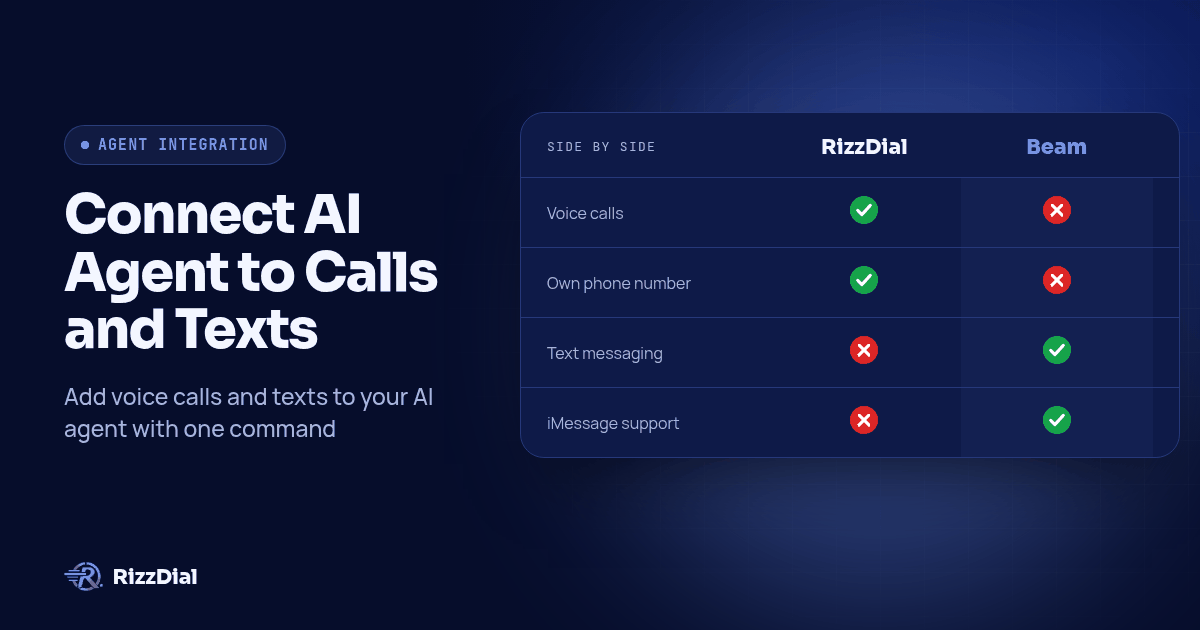
Giving an AI agent a phone is really two separate upgrades. One is a voice line: it can dial out, pick up, run a voice agent, and hand you a transcript afterward. A second messaging line lets it send and receive iMessage, SMS, RCS and FaceTime Audio. RizzDial covers the first, Beam covers the second, and most agents connect to either one the same basic way: open the MCP page in your dashboard, copy the URL for your client, and run one command. In Claude Code that command is claude mcp add --transport http rizzdial YOUR_RIZZDIAL_MCP_URL followed by claude mcp login rizzdial. Codex, Cursor, the ChatGPT desktop app, the Claude app and Grok each have their own one line version of the same step, and every one of them is covered below with a link to the full guide.
Answer first: Pick your agent, get the MCP URL from the RizzDial or Beam dashboard, and connect with either a browser OAuth approval (RizzDial, Claude, Cursor, Codex, ChatGPT, Grok) or a bearer token header (Beam). Once connected, you ask for what you want in plain language: list your AI agents, check a number, read a transcript, start a campaign, send a text. Anything your account can do, the agent can now do, which is exactly why writes need a confirmation step.
Everything below was verified on 2026-10-12 against the RizzDial MCP connect guide, the Cursor MCP docs, the OpenAI Codex MCP docs, the Claude custom connector article, and the Model Context Protocol transport specification.
What has a phone, and what doesn't?
RizzDial and Beam split the work. Neither one does the other's job, so match the capability to the product before you start connecting anything.
| Capability | Product |
|---|---|
| Make and receive phone calls | RizzDial |
| Own phone number for voice | RizzDial |
| AI voice agent | RizzDial |
| Call transcripts | RizzDial |
| Answering machine detection | RizzDial |
| iMessage | Beam |
| SMS | Beam |
| RCS | Beam |
| FaceTime Audio | Beam |
If the task is "call this lead and confirm Thursday," you want RizzDial. If it is "text this lead and loop in a voice agent if they ask to talk," you want both, which is a normal setup: an agent connected to RizzDial for calls and Beam for messages, working off the same contact.
Which agent should you connect first?
Every client below reaches RizzDial through MCP, a protocol that lets an agent call tools on a remote server after a one time approval. Each client stores and authorizes MCP servers its own way, so the one line version of the connection step differs from client to client.
| Client | How it connects | Guide |
|---|---|---|
| Claude Code | claude mcp add --transport http rizzdial YOUR_RIZZDIAL_MCP_URL, then claude mcp login rizzdial |
Add phone calls to Claude Code |
| Claude app (claude.ai and Desktop) | Customize, Connectors, Add custom connector, paste the URL, approve sign in in the browser | Can Claude make phone calls? |
| Codex | codex mcp add rizzdial --url YOUR_RIZZDIAL_MCP_URL |
Add phone calls to Codex |
| ChatGPT desktop app | Settings, MCP servers, Add server, paste the Streamable HTTP URL, save, restart, authenticate | Can ChatGPT make phone calls? |
| Cursor | Paste the URL into .cursor/mcp.json under mcpServers, approve the browser sign in on the first tool call |
Connect Cursor to phone calls |
| Grok Bot (cloud agent) | Tell it in chat: add a custom MCP server named rizzdial at your dashboard URL, then click Authorize on the connect card | Connect Grok Bot to your phone |
| Grok Build CLI | From the Grok tab on the RizzDial dashboard: grok mcp add --transport http rizzdial YOUR_RIZZDIAL_MCP_URL |
Connect MCP page |
| Any MCP client over HTTP | Point the client at the dashboard URL and complete the OAuth approval, or send a bearer token header where OAuth isn't supported | What is MCP |
| Anything that calls a REST API (n8n, Zapier style automation) | Call the REST endpoints directly with a personal access token in the Authorization header | Build an AI calling agent with the API |
A few notes worth knowing before you pick a row. Claude Code and Codex both come from the same dashboard tabs and are covered together in one guide, because the underlying RizzDial server is identical; only the CLI command differs. Claude's app connector works differently from Claude Code: it runs from Anthropic's own cloud rather than your machine, which is why it needs a publicly reachable URL and why it suits a teammate who has never opened a terminal. Cursor stores the server in a JSON file in your project or home folder rather than through a CLI subcommand, per the Cursor MCP docs. ChatGPT's desktop app and Codex share the same configuration format under the hood, documented together at developers.openai.com. Grok Bot is different again: it runs on a cloud computer, so it can only reach a public HTTPS server, and you add the server by asking it in chat rather than editing a file, as a staff answer on the Cursor forum explains. Once it is connected, the same account can also run an AI voice agent from Grok Bot, and on the messaging side Beam covers an iMessage number for Grok Bot and FaceTime Audio for Grok Bot.
Those last two rows are not single clients. "Any MCP client over HTTP" means exactly that: if whatever you are using speaks MCP and can reach a URL over the internet, the same dashboard URL and the same OAuth approval apply, per the MCP transport specification. "Anything that calls a REST API" covers automation tools like n8n or Zapier, where the better move is usually to skip MCP entirely and call RizzDial's REST endpoints from an HTTP node with a token, which is covered in the REST guide linked above.
More guides get added to this list as they ship. We are not promising a date for any specific client that is not already linked above, only that this table gets longer rather than staying still.
Should you use MCP or REST, and why does it matter?
MCP and the REST API solve different problems, and mixing them up is the most common way these setups go wrong.
MCP is for a person in the loop. You type a request, the client decides which tool to call, and you watch the result come back in the same chat or editor session you were already using. That is the right shape for exploring an account, answering a one off question, or running a task where you want to see what happened before it happens again.
REST is for code that runs the same way every time, with no one watching. You write the exact calls, in the exact order, authenticated with a personal access token or an OAuth client instead of a browser approval. A nightly job, a webhook handler, or a feature inside your own product belongs here, not behind an agent that might choose a different plan on a different run.
In practice, the pattern that works is both, used in order. Explore over MCP until you know exactly which calls you need for a given job, then have a coding agent write those exact calls against the OpenAPI spec and run that instead. Build an AI Calling Agent with Claude and the RizzDial API walks through that second step with working code.
Why does RizzDial use OAuth while Beam uses a bearer token?
RizzDial and Beam authorize connections differently, and it is worth knowing which one you are dealing with before you go looking for a token that does not exist, or a login screen that never appears.
RizzDial's MCP server runs on browser based OAuth. You run the connect command for your client, a browser tab opens, you sign in to the RizzDial account you want this connection bound to, and you approve. From then on, that client acts with that account's permissions. No token to copy, no header to write by hand, for Claude Code, Codex, the Claude app, Cursor, the ChatGPT desktop app or Grok.
Beam works the other way. You generate a token from Settings, Developer access, MCP and API in the Beam dashboard, and your client sends it as a bearer token in the Authorization header rather than going through a browser approval. That is a better fit for an automated client that should not need a human sitting at a login screen the first time it runs, which is part of why the Codex iMessage guide on Beam, linked at the end of this page, walks through the header directly instead of an OAuth flow.
Either way, the account on the other end of that approval or that token is the account your agent acts as. Pick the right one before you connect anything.
How do you stay safe once the connection acts as you?
Read this section before the dashboard page, not after. Once a client is connected and authorized, whatever it does through that connection is a real change in your account, the same as if you had clicked the button yourself. "Clean up the old campaigns" can delete campaigns. "Text everyone on that list" sends real messages to real phones.
Four habits are worth setting up on day one, for RizzDial and for Beam:
- Use a dedicated user for automation. A separate login for your agent connections means you can see exactly what it touched and cut it off without disturbing anyone's regular access.
- Confirm writes explicitly. Tell the agent, in its project or system instructions, to state the change it is about to make and wait for a yes before anything that deletes, buys a number, or starts a live campaign or message blast.
- Revoke from the dashboard, not just locally. Removing a server from a config file stops your own client from trying again; access granted through a browser approval or a token is revoked where it was granted.
- Treat an unexpected approval prompt as a decision, not a formality. A sign in request you did not just trigger is a reason to deny it and go find out why it showed up.
Calls placed through any of this are still calls, and they are regulated the same as any other outbound call. A February 2024 FCC declaratory ruling treats AI generated voices as "artificial" voices under the TCPA, so prior express consent rules apply; see the ruling at fcc.gov. A contact marked do not call in RizzDial is honored at the contact level regardless of what triggered the call. None of this is legal advice, and an agent cannot make that judgment for you before it dials or sends.
What do people ask about AI phone agents?
Does my AI agent need its own phone number to make calls?
Not always. Reading data, like call history or a list of your AI agents, works through any authorized connection. Placing an outbound call needs a number assigned to that specific voice agent, which you can search for and assign through RizzDial, over MCP or the dashboard.
What is the real difference between connecting over MCP and calling the REST API directly?
MCP is for a person driving an agent in a chat or an editor, picking tools turn by turn and approving along the way. REST API calls run the same way every time because you write them once, authenticated with a token instead of a browser approval. Use MCP to explore, then move anything that has to run unattended onto the REST API.
Can ChatGPT or Codex make outbound phone calls today?
Through a connection to RizzDial, yes. ChatGPT's desktop app adds RizzDial as an MCP server under Settings, MCP servers, and Codex adds it with one command in the terminal. Neither makes calls on its own; both call RizzDial once connected.
Is it legal to let an AI agent place calls to customers?
These calls are still regulated the same as any other outbound call. A February 2024 FCC ruling treats AI generated voices as artificial voices under the TCPA, so prior express consent applies, and a contact marked do not call stays marked that way regardless of what triggered the call. None of this is legal advice.
How do I give my agent texting or FaceTime Audio instead of voice calls?
That runs through Beam rather than RizzDial. Beam connects over MCP with a bearer token instead of a browser approval, and covers iMessage, SMS, RCS and FaceTime Audio. A separate Codex iMessage guide, linked below, shows the same shape for a different client.
Start with the client you already use every day: open its MCP page or settings screen, paste the URL, and approve once. This series covers the specific steps for Cursor, ChatGPT, the Claude app, Claude Code and Codex, and the REST API, with Codex and iMessage over on Beam for the messaging side. Check the integrations page for what else RizzDial already connects to, or the MCP page for the exact URL for your own account.
Get API access or book a call to connect your account.
How can RizzDial help with your calling workflow?
RizzDial is the AI outbound sales workspace for teams on GoHighLevel. Power dialing, AI voice agents, SMS automation, and CRM workflows in one platform. Book a demo.