Agencies
AI Virtual Receptionist for Multi-Location Routing
TL;DR: An AI virtual receptionist identifies the right location before it acts on a call, using the number the caller dialed, a menu choice, or an existing contact record, then applies that location&#
By James Hill, Founder, RizzDial ·
TL;DR: An AI virtual receptionist identifies the right location before it acts on a call, using the number the caller dialed, a menu choice, or an existing contact record, then applies that location's own hours, calendar, and transfer rules. Get the identification step wrong and everything downstream, the booking, the transfer, the answer, is wrong too.
We have configured enough multi-location voice agents for GoHighLevel agencies to know where these projects actually go sideways. It is almost never the AI's voice quality or its ability to hold a conversation. It is the moment right after "hello," when the system has to decide which office this caller belongs to before it does anything else. Get that wrong and a caller trying to reach the Fort Worth branch books an appointment on the Dallas calendar, and nobody notices until a patient shows up at the wrong building. This guide walks through how that identification step actually works, the setups available to an agency, and the test procedure we run before any multi-location client goes live.
What Does "The Right Location" Mean to an AI Virtual Receptionist?
A caller never says "please route me using my dialed number's location mapping." They say "I need to reschedule my cleaning" or "can someone come look at my AC unit." The AI has to translate that into a location and, often, a department, before it can touch a calendar or a transfer destination. For a four-branch dental group, that means matching the call to the right office's hours, the right office's provider list, and the right office's booking rules. For a regional HVAC franchise, it might mean matching the call to the branch that actually services that zip code, not just the branch nearest the main office.
Treat location identification as its own step in the call flow, separate from intent detection. An AI agent that figures out "this caller wants to book a repair visit" but applies the wrong branch's technician schedule has not actually helped anyone. It has just failed more politely than a generic answering machine would have.
How Does the Routing Decision Actually Get Made?
There is no single mechanism here. Multi-location routing runs on one or more of four signals, and most real deployments combine at least two of them.
The first signal is the number dialed. If each location advertises its own tracking number, whether on its own Google Business Profile, its own ads, or its own signage, the system already knows the location before the AI says a word. This is the cleanest signal because it requires zero caller effort and zero guesswork.
The second signal is a menu choice, spoken or keyed. When one shared number serves every location, an IVR layer or an AI menu asks the caller to say or press the location, or routes based on a department keyword inside the greeting. GoHighLevel's own documentation on inbound routing describes this as a sequential priority system: an IVR or workflow handles the call first if one is configured on that number, and only after that layer resolves (or times out) does the call move to direct answering, owner-based routing, or forwarding (GoHighLevel, inbound call flow). An AI virtual receptionist sitting on a shared number has to live inside that same priority order, not bypass it.
The third signal is the contact record. A returning caller whose number already exists in the CRM, tied to a specific location from a past visit or a past campaign, can skip the menu altogether. We cover exactly how to test that lookup, including what should happen when a returning caller's number has moved between locations, in our returning caller context test guide.
The fourth signal is staff-side, not caller-side: who is available to take the call once the AI has picked a location. GoHighLevel's routing documentation notes that a team member can opt into receiving calls from up to 10 selected locations at once on the mobile app, with a location badge on the incoming call screen showing which sub-account the call belongs to, and a "Switch Location" option to jump into that account's tools mid-call (GoHighLevel, multi-location incoming calls). An AI agent handing off to a human still needs to know which of that rep's locations the call belongs to, or the handoff loses the context the AI just gathered.
Diagram: a horizontal flow showing a caller icon branching into four labeled paths, dialed number, menu choice, contact record match, and staff availability, each converging into a single "location confirmed" box before a second branch splits into book, transfer, or answer.
What Are the Steps to Build Multi-Location Routing From Scratch?
Here is the sequence we actually run with a new multi-location client, in order.
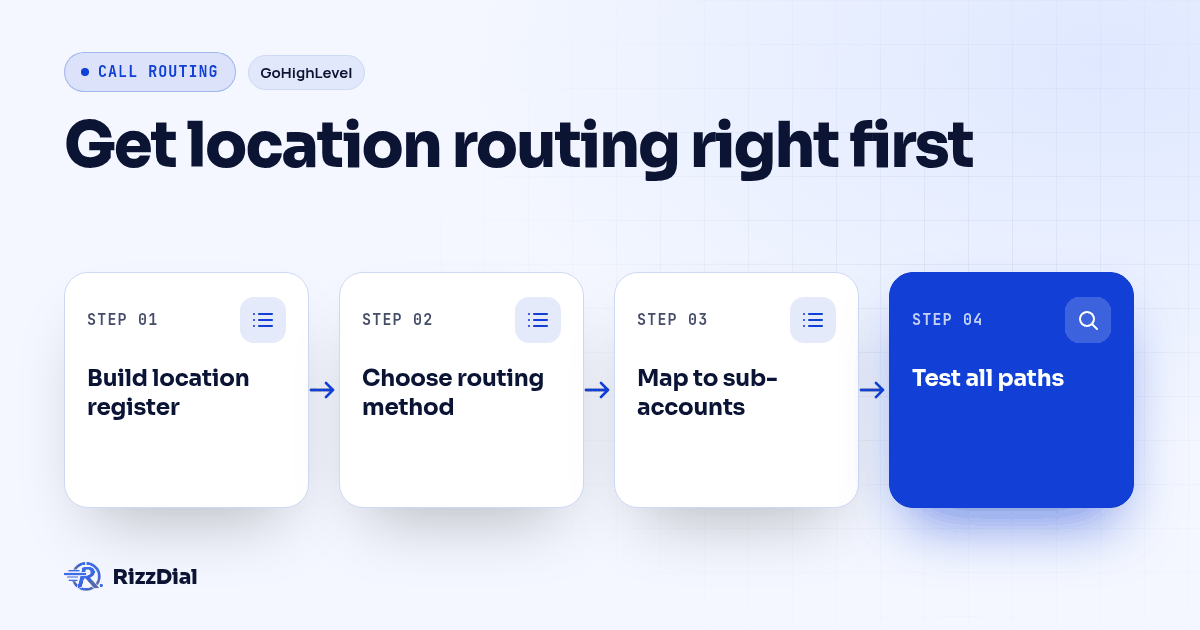
- Build the location register first, before touching the phone system. List every location, its hours, its calendar, its service area or department scope, and the person who owns exceptions when the AI cannot resolve something.
- Decide the identification model per number. Dedicated tracking number per location, shared number with a menu, or a hybrid where only the highest-volume locations get their own number and the rest share one. Write the decision down; do not leave it implicit in the configuration.
- Map each location to its GoHighLevel sub-account. The AI's booking and transfer actions need to land in the correct sub-account's calendar and contact record, not a shared account that mixes every location's data together.
- Write the greeting and menu wording for the shared-number path. Keep location names distinct enough that a caller with a bad phone connection or an accent can still be understood by the menu logic.
- Configure the fallback for ambiguous calls. A caller who says "the one on Main Street" when two locations have a Main Street needs a defined next step, not a guess.
- Connect the contact lookup so returning callers skip the menu. If a number already exists in a location's contact record, confirm the AI pulls that location instead of asking again. Our CRM integration guide covers how the call outcome needs to write back to the correct sub-account afterward, not just the correct contact.
- Run the acceptance test below on a spare number before moving any real traffic.
How Do the Main Routing Setups Differ?
| Setup | How location gets identified | Good fit for | Watch for |
|---|---|---|---|
| Dedicated number per location | Number dialed, before the AI speaks | Locations with separate ad accounts or separate Google Business Profiles | More numbers to monitor for caller ID reputation and spam labeling |
| Shared number with IVR/AI menu | Caller's spoken or keyed choice | Smaller chains advertising one brand number | Adds a step before the AI can help; menu wording has to be unambiguous |
| Contact-record match | Existing CRM history tied to a location | Repeat-visit businesses, clinics, service contracts | Only works for callers who have called before; needs a clear new-caller fallback |
| Hybrid | Dedicated numbers for top locations, shared menu for the rest | Franchises with a few high-volume branches and several smaller ones | Requires maintaining two routing logics instead of one |
None of these is the right answer by itself. A six-location client we would configure today usually ends up on the hybrid row: the two busiest branches keep their own advertised numbers, and the other four share a line with a short AI menu, because building four more tracking numbers for low-volume branches rarely earns back the setup time.
If you are evaluating platforms for this specific job rather than building it on RizzDial already, our Retell alternative comparison covers the native carrier access and configuration depth a multi-location setup actually needs, since the demo call almost never shows the location-handling layer.
How Do You Test Routing Before You Trust It With a Live Caller?
Do not approve a multi-location configuration off a single successful test call. Run this sequence against every location before any real number goes live.
- Call the dedicated number for each location, if one exists, and confirm the AI states that location's correct hours and service scope.
- Call the shared number, if one exists, and pick each menu option in turn, confirming each one lands on the right location's calendar.
- Call from a number already in the CRM tied to a specific location, and confirm the AI skips the menu and uses that location automatically.
- Call from that same CRM number pretending to ask about a different location, and confirm the AI either corrects itself or asks a clarifying question instead of silently booking the wrong office.
- Say an ambiguous location name on purpose and confirm the fallback owner gets notified rather than the AI guessing.
- Ask for a transfer at each location and confirm the receiving team member sees the correct location badge or sub-account, not a generic one.
- Let a call go unanswered at each location and confirm the AI fallback, not a different location's team, picks it up.
Our buying and launch guide goes deeper on writing acceptance criteria for AI receptionist calls generally; treat the seven steps above as the multi-location addition to that same checklist, not a replacement for it.
What Should a Multi-Location Routing Checklist Include?
Copy this into your own project notes before the first configuration call with a client. The record should hold a location register listing each location's name, hours, calendar ID, service area, and fallback owner, alongside the identification model chosen for each number, whether that is dedicated, shared menu, contact match, or hybrid, and the GoHighLevel sub-account mapping for every location. It should also confirm the menu wording has been reviewed for ambiguity, including duplicate street names and similar city names, and that the returning-caller lookup has been checked against each location's own contact history. Round it out with confirmation that transfer destinations show the correct location context to the receiving team member, that fallback behavior is defined and tested for unresolved or ambiguous location requests, and that all seven test calls above have been run and logged, with a pass or fail result recorded for each location.
If the client evaluating this is the small business owner rather than the agency building it, AI Guy's AI agent buying checklist for small business walks through the vendor questions worth asking before signing anything, from a buyer's seat rather than a builder's.
What Questions Do Agencies Ask About Multi-Location AI Virtual Receptionist Routing?
What does an AI virtual receptionist cost for a multi-location business?
RizzDial charges 6 to 20 cents per minute for AI talk time, billed only for the minutes the AI actually spends on the phone, with pay as you go and flexible seat based options. A multi-location setup does not add a separate location fee on top of that; it adds configuration work, tracking numbers, routing rules, and a fallback owner for each location, that your team or your agency has to build and maintain. We built RizzDial, so compare that talk-time rate against any other vendor's published terms before you commit a multi-location client to a platform.
How long does it take to set up multi-location call routing for an AI virtual receptionist?
Budget a short pilot measured in days, not hours, and do not put a live client on the main number first. Build the location register, wire the tracking numbers or IVR menu, write the fallback owner for each location, then run the acceptance test on a spare number before moving a single real phone number into production.
Does each location need its own phone number, or can one number route every caller?
Both models work, and the right one depends on how the client's ad spend and GoHighLevel sub-accounts are structured. Dedicated tracking numbers per location make call attribution automatic and keep each sub-account's call history clean, while a single number with an IVR or AI routing layer is easier to advertise but pushes more of the identification work onto the opening seconds of the call. GoHighLevel's own call flow documentation covers how IVR, team ownership, and forwarding stack in priority order.
What happens to our routing rules if we switch AI virtual receptionist vendors?
Do not assume the routing configuration will transfer automatically. Before switching, ask the current vendor what can be exported, then save the location register, number assignments, menu wording, calendars, transfer destinations, and fallback owners in a document your agency controls. Rebuild any items the export does not include, and test the new routing on a spare number before retiring the existing setup.
How Should an Agency Decide Its Own Setup?
Start from the location register, not from the phone system. Once every location's hours, calendar, and fallback owner are written down, the identification model mostly picks itself: high-volume locations with their own ad spend earn a dedicated number, lower-volume ones share a menu, and returning callers skip both once the contact record carries the location. Run the seven-step test against every location before a client's real number touches the configuration, and keep the checklist above attached to the project so the next renewal conversation starts from evidence instead of a demo call that only ever tested one branch.
About RizzDial
RizzDial is the AI outbound sales workspace for teams on GoHighLevel. Power dialing, AI voice agents, SMS automation, and CRM workflows in one platform. Book a demo.