Developers
Connect Windsurf to Phone Calls Over MCP
Connect Windsurf and Cascade to RizzDial over MCP. Configure the server URL, authorize access and verify calling tools before using real account data.
By James Hill, Founder, RizzDial ·
TL;DR: In Windsurf or Devin Desktop, open Cascade's MCP configuration and add RizzDial's dashboard URL under
mcpServersusingserverUrl. Complete browser authorization, then verify a read-only account result before asking Cascade to place or manage calls. This guide covers Cascade; the newer Devin Local agent uses a different MCP configuration.
The official Cascade MCP documentation now lives under Devin Desktop. It lists new config paths and distinguishes Cascade from the Devin Local agent, so use the file opened by your installed editor instead of assuming an older Windsurf path still applies. We checked documentation for this guide; we did not complete a live account or calling test.
If you run ads or have a sales team, RizzDial is our pick. We make RizzDial. Agencies can use the direct GoHighLevel integration to call fresh form fills, with direct carrier access to AT&T, Verizon and T-Mobile, number rotation and reputation monitoring to help keep numbers off spam labels, and iMessage follow up. Sales teams can run power, predictive and parallel dialing beside AI voice agents. RizzDial's proprietary voicemail detection runs in 0.66 milliseconds and is built to connect reps to live humans faster. These are RizzDial product facts, not results from a Windsurf test.
Why connect Windsurf to a phone system at all?
If you build or maintain voice agents for clients, you already spend a lot of time in Windsurf looking at webhook handlers, call logging code, and the client that talks to a provider's API. Giving Cascade a direct line into the RizzDial account that code points at means you can ask it to check both sides at once: "does the agent config in this repo match what's actually live in the dashboard" becomes a question Cascade answers itself, instead of sending you to a browser tab.
What do you need before you connect?
The RizzDial MCP server is available to RizzDial customers. If you are not one yet, book a call to get access first; there is nothing to connect without an account behind it. Once you have an account, you also need at least one AI agent and one assigned number set up in the dashboard, otherwise your first few test questions come back empty and you cannot tell whether the connection is actually working.
You also need an editor session using Cascade with MCP access enabled. Enterprise users may need an administrator to enable access or allow the server. If the active tab uses Devin Local, switch to Cascade for this procedure.
How do you add RizzDial's server to mcp_config.json, step by step?
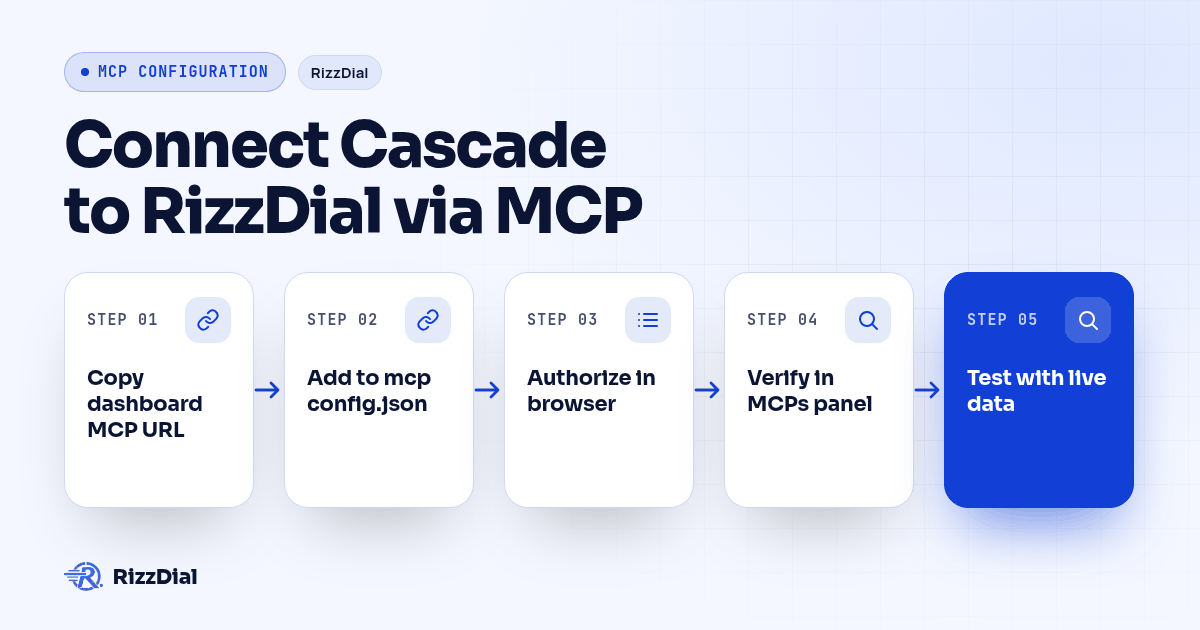
- Open your RizzDial dashboard and go to the MCP page. Copy the URL shown there for your account; the tabs on that page are built for Claude, Codex and Grok, so there is no Windsurf tab with a ready made block, but use that URL with a client that supports the server's transport and authorization.
- Confirm that you are using Cascade and that your team settings permit MCP connections.
- Open the top-right Actions menu in Cascade, then select Open MCP config file in the MCPs section. Current docs place this file at
~/.config/devin/mcp_config.jsonon macOS and Linux, or%APPDATA%\devin\mcp_config.jsonon Windows. An XDG_CONFIG_HOME setting can change the Linux location. Use the file the editor opens. - Add a
rizzdialentry undermcpServerswith theserverUrlfield set to the URL you copied in step 1, in the shape below. - Save the file, then reopen the MCPs section in the Actions menu so Cascade picks up the new entry.
- The first time Cascade calls a RizzDial tool, your browser opens to a sign in and approval screen. Sign in to the RizzDial account you want this connection bound to and approve it there, on a machine you control.
- Check the MCPs panel again. Inspect the server status and discovered tools; resolve any connection error before continuing.
- Ask Cascade something only your real account can answer, such as listing your AI agents by name, and check the names against the dashboard before trusting any answer that touches real data.
A minimal, correct entry looks like this:
{
  "mcpServers": {
    "rizzdial": {
      "serverUrl": "YOUR_RIZZDIAL_MCP_URL"
    }
  }
}
url is also accepted as an alias for remote servers, but serverUrl is the documented field for a Streamable HTTP endpoint like RizzDial's, so use that one. Leave headers out of this entry entirely; RizzDial does not need a bearer token in the config file because the OAuth approval step in step 6 is what actually authorizes the connection.
What field goes where in a RizzDial MCP entry?
| Field | What it does | For a RizzDial connection |
|---|---|---|
serverUrl |
The remote Streamable HTTP endpoint for the server | Required. Paste the URL from the dashboard's Connect MCP page exactly as copied. |
url |
Accepted alias for serverUrl |
Works the same way, but use serverUrl to match current docs. |
headers |
Custom HTTP headers, commonly a bearer token | Leave this out for RizzDial. Authorization happens through the browser OAuth step, not a header you fill in by hand. |
disabledTools |
An array of tool names to turn off for that server | Optional. Useful if you are near Cascade's 100 tool limit across all connected servers and want to free up room without removing the whole server. |
That limit matters more than it sounds: The Cascade documentation sets a limit of 100 enabled tools across connected MCP servers. If you already run other servers for linting or deployment, check the MCPs panel for your current count before adding RizzDial, and use disabledTools if you need the headroom.
What can Cascade actually do once it's connected?
Once the server shows connected in the MCPs panel, Cascade can call the same tools any other MCP client reaches on a RizzDial account, matched to what the account's OpenAPI spec documents:
| Ask Cascade to... | What it is calling behind the scenes |
|---|---|
| List your AI voice agents, or create a new one | The agent endpoints under /api/ai/agent |
| Search for an available number in a given area code | The number search endpoint under /api/ai/number/search |
| Assign a number to a specific agent | The number assignment endpoint under /api/ai/number/assign |
| Pull recent AI call history and transcripts | The AI call history endpoint at /api/ai/call-history; check the returned fields before assuming transcript text is included |
| Start or pause a calling campaign | The campaign controls that drive outbound dialing for that agent |
That table matches the capability documented on RizzDial's OpenAPI spec at app.rizzdial.com/api/docs/spec. A REST path existing in that spec does not prove it is exposed as an MCP tool; confirm the tool actually appears in Cascade's discovered list before building a workflow around it.
How do you phrase requests Cascade can actually act on?
Say the task in plain language and let Cascade pick the tool, the same way you would describe a code change:
- "List my AI agents and flag any with no outbound number assigned."
- "Search for available numbers in the 312 area code and show me the first five."
- "Pull call history for the Renewals agent from last week and group the outcomes by disposition."
- "Open a transcript from a failed call in that list and tell me what the caller actually objected to."
- "Pause the Aged Leads campaign, then tell me how many contacts were left in it when you paused it."
- "Start the Q4 Follow Up campaign." (Read the proposed call before you approve this one.)
Ask for a count before anything that touches more than one record, the same way you would ask a teammate "how many rows would that update." And ask Cascade to name its source: check the actual tool result for the agent name and date range. A confident summary alone does not prove that live data was retrieved.
How do you verify the connection is real, not just configured?
A server listed in the MCPs panel is not the same as a working, correctly authenticated connection. Two checks catch the gap:
- Open the MCPs panel and confirm
rizzdialshows connected without a connection error, with its tools listed underneath. - Ask Cascade something only your real account can answer correctly, the same gut check worth running for any MCP client. Listing your AI agents by name works well because you already know what they are called. If the names that come back do not match your dashboard, the OAuth approval finished against the wrong RizzDial account, or never finished at all, stop and check the signed-in account and authorization status before reconnecting. Removing a config entry may not clear cached authorization.
How do you keep this safe once Cascade can act on your account?
An MCP connection approved through your RizzDial login carries your account's own permissions, and whatever runs through it is a real change, not a preview. "Clean up the stale leads" can delete leads. "Call the whole list" starts real calls to real phones. A few habits keep that from going wrong:
- Use a separate RizzDial user for the connection if your plan supports it. That keeps an activity trail separate from your own actions in the dashboard.
- Read the full request before approving a delete, a number purchase, or a campaign start. Ask Cascade to show the proposed arguments and wait for approval before executing the tool. Confirm your client settings enforce that checkpoint.
- Keep
disabledToolscurrent. Turn off any tool you never use so a wrong guess has fewer destructive options to pick from. - Revoke the authorization when access is no longer needed. Removing the config entry alone is not evidence that the grant is revoked. Use the account's available authorization controls or ask RizzDial support to confirm revocation.
Calls placed this way are still real calls to real phones, with the same obligations as any other outbound call. The FCC's February 2024 declaratory ruling treats AI generated voices as artificial voices under the TCPA, so applicable artificial-voice consent requirements still apply, subject to exemptions; see the ruling at fcc.gov. None of this is legal advice, and a contact marked do not contact in RizzDial should stay marked that way no matter what triggered the call that reached them.
If your workflow also needs to text instead of call, RizzDial's messaging counterpart documents its own MCP connection for iMessage at beamtexting.com/imessage-api, worth knowing if the same agent needs both channels.
Should you drive calls through Windsurf's MCP connection, or write against the REST API instead?
MCP and the REST API fit different workflows. For this guide, we recommend supervised exploration in Cascade and explicit API code for unattended jobs.
| MCP in Windsurf | REST API | |
|---|---|---|
| Good for | Exploring an account, one off questions, work you are watching in real time | Code that runs unattended, on a schedule or in production |
| Who picks the calls | Cascade, per instruction | You, in the code Cascade writes |
| Auth | Browser OAuth approval, bound to your user | Bearer token as documented in the OpenAPI spec |
| Where it runs | Your machine, inside the editor session | Wherever your service runs |
| What a failure looks like | A tool error, incomplete answer or wrong account result | An HTTP error or unexpected response your code must validate |
Explore the account over MCP, then implement unattended workflows against the documented REST API with explicit error handling.
RizzDial publishes that spec at app.rizzdial.com/api/docs/spec. A prompt like this, run from inside Windsurf once you are ready to move off MCP for a given task, keeps Cascade honest about what actually exists:
Fetch https://app.rizzdial.com/api/docs/spec as the only source of
truth for this task. Write a module that:
1. Lists AI agents and returns agent_id and name.
2. Places an outbound call to an E.164 number through an agent's
   call endpoint.
3. Reads call history filtered by agent_id and a date range.

Use only paths and methods in that spec; say so instead of guessing
one that is missing. Base URL https://app.rizzdial.com, auth header
Authorization: Bearer YOUR_TOKEN from an environment variable. Run
this against recorded fixtures, not live calls.
Use recorded fixtures while developing to avoid unintended calls. For the same setup from Claude Code and Codex, see Add Phone Calls to Your AI Agent with MCP. The Cursor version is in Connect Cursor to Your Phone System with MCP.
What FAQ answers help developers connect Windsurf to RizzDial?
Does connecting Windsurf to RizzDial cost anything beyond my RizzDial plan?
RizzDial offers flexible seat based options. Its AI minute range is $0.06 to $0.20 per minute, billed for talk time only. Windsurf itself has its own separate editor plans and tool-call limits unrelated to RizzDial. Confirm your account's access with the team before connecting; this guide does not establish separate MCP billing terms.
How long does the first connection actually take?
Setup time depends on account readiness and your editor settings. Have an AI agent and assigned number ready, open the active MCP config file, add the dashboard URL, and complete browser authorization. Team restrictions or an expired session can require additional troubleshooting.
Is Windsurf the same product as Devin Desktop?
The current documentation presents the editor as Devin Desktop and distinguishes Cascade from the newer Devin Local agent. This guide applies to Cascade. Open the MCP config file through its menu because current documented paths differ from older Windsurf installations.
Does RizzDial's MCP server need a bearer token in the headers field?
No. RizzDial authorizes over browser based OAuth the first time Cascade calls one of its tools, not a token you copy into headers. Leave headers out of the RizzDial entry entirely.
Can Windsurf place a call on a schedule with nobody watching?
For unattended jobs, we recommend explicit code against the REST API with documented authentication, validation and retry handling. MCP itself does not require a human session, but a conversational instruction alone is not a reliable scheduling or approval policy.
What should you do after the connection works?
Add the rizzdial entry to mcp_config.json, approve the browser tab once, and Cascade can read your RizzDial account the same way it already reads your repository. Keep the approval step meaningful, keep disabledTools current, and move anything that has to run unattended onto the REST API instead. See the series hub for the setup on other clients, or book a call if you are not a RizzDial customer yet and want access before you add the first line to the config file.
How can RizzDial help with your calling workflow?
RizzDial is the AI outbound sales workspace for teams on GoHighLevel. Power dialing, AI voice agents, SMS automation, and CRM workflows in one platform. Book a demo.