Developers
Trigger AI Outbound Calls from GoHighLevel with Webhooks and the RizzDial API
How to fire a RizzDial AI outbound call from a GoHighLevel workflow: get the agent call endpoint, configure the Custom Webhook action, normalize phone numbers, and handle errors.
By James Hill ·
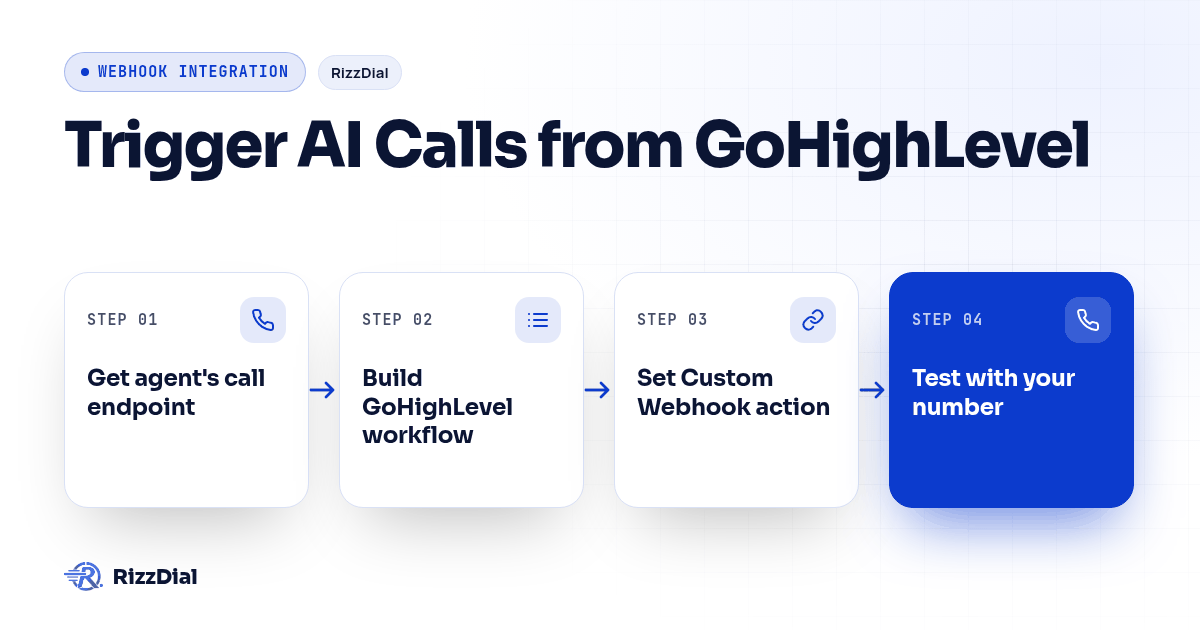
A lead submits a form in GoHighLevel and you want an AI agent on the phone with them right away. The shortest path is one workflow, one webhook action, one URL. Everything below was verified against the live RizzDial OpenAPI spec and HighLevel's help center on 2026-09-24.
Answer first: Starting a RizzDial AI call is two requests. First,
GET /api/ai/agent/call-endpoint?agent_id=YOUR_AGENT_IDwith a bearer token returns a per-agent URL. Second, anything that can POST JSON to that URL places the call, no bearer header needed, because the token in the path is the credential. In GoHighLevel, the thing doing the POST is the Custom Webhook workflow action, withphone_numberin E.164 format andcall_modeset tooutbound.
The two-step model, and why it matters
Most of the confusion around this integration comes from assuming one URL does everything. It does not.
| Step | Request | Auth | Who calls it |
|---|---|---|---|
| Get the endpoint | GET /api/ai/agent/call-endpoint |
Authorization: Bearer YOUR_TOKEN |
You, once, from your terminal |
| Place the call | POST to the returned URL |
None. The path token is the credential | GoHighLevel, or your relay, every time |
That design is what makes a GoHighLevel workflow able to dial at all: the webhook action never has to hold an API token. It also means the endpoint URL is a live credential. Anyone who has it can make your agent dial, so keep it out of shared docs, screenshots and client-facing sub-accounts.
Step 1: get the agent's call endpoint
Existing RizzDial customers create a personal access token in the dashboard under Profile, Settings, Personal Access Tokens. Then:
curl -s "https://app.rizzdial.com/api/ai/agent/call-endpoint?agent_id=YOUR_AGENT_ID" \
  -H "Authorization: Bearer YOUR_TOKEN" \
  -H "Accept: application/json"
The response tells you the URL, the method and the fields the endpoint accepts:
{
  "status": "success",
  "data": {
    "endpoint": "https://app.rizzdial.com/webhooks/ai/create-phone-call/eyJpdiI6...",
    "Method": "POST",
    "form_data": [
      "phone_number",
      "first_name",
      "last_name",
      "ghl_contact_id",
      "override_agent_id",
      "call_mode=outbound (outbound/inbound)",
      "local_presence_number=No (Yes/No)"
    ]
  }
}
The same URL is in the dashboard: open AI, AI Agents, then the agent's Actions menu, then Endpoints, and use Copy URL on the Outbound tab. The Endpoint docs page documents both tabs. Outbound rings the person. Inbound does not ring anyone; it registers a call and returns a dialSip address for your own phone system to bridge, which is not what a GoHighLevel workflow wants.
Before sending anything real, confirm three things: agent status Active, an outbound number assigned to the agent (Advanced tab, Phone Number Configuration), and call balance on the account. Each failure has its own error, covered below.
Step 2: build the GoHighLevel workflow
Open Automation, Workflows, Create Workflow in the sub-account.
Trigger. Form Submitted fires when a selected HighLevel form is submitted, and Contact Created fires when a new contact record is added. Form Submitted is usually the better choice, because a form submission is evidence of who asked to be contacted and a contact record can arrive from an import.
Filters. Add an If/Else branch that continues only when your consent field or tag is present. Details below.
Timing. Add a Wait action if you do not want calls landing at 6am. HighLevel's Wait action has an Advance Window with Resume On (which days) and Resume Between Hours (the time range), evaluated in the workflow timezone.
The call. Add the Custom Webhook action, which HighLevel lists under the Send Data category in its Custom Webhook article. Configure it like this:
| Field | Value |
|---|---|
| Event | CUSTOM |
| Method | POST |
| URL | the endpoint URL from step 1 |
| Authorization | None |
| Content-Type | application/json |
| Body | Raw Body, the JSON below |
{
  "phone_number": "{{contact.phone}}",
  "first_name": "{{contact.first_name}}",
  "last_name": "{{contact.last_name}}",
  "ghl_contact_id": "{{contact.id}}",
  "call_mode": "outbound"
}
Insert each merge field with the dynamic value picker (the tag icon) rather than typing it, because availability depends on the trigger. HighLevel also ships an older, simpler Webhook (Outbound) action with a Method, a URL and key-and-value Custom Data pairs. It works for this, but Custom Webhook gives you the raw JSON body and headers, which you will want the moment you add a relay.
ghl_contact_id attaches the CRM contact to the call, which is what lets results land back on the right record. call_mode defaults to outbound if omitted, so sending it explicitly is about being readable later, not about behavior. Anything else you add passes through to the agent as a dynamic variable it can use mid-call, so "policy_renewal_date": "{{contact.policy_renewal_date}}" is a legitimate thing to send.
Phone numbers must be E.164
phone_number should be E.164: a plus sign, the country code, then the number, for example +12137771235. Contact phone values in a sub-account often arrive in mixed formats from imports, hand entry and third-party forms, which is how ten-digit values and parentheses end up in the field.
So {{contact.phone}} is usually right and sometimes not. RizzDial adds +1 to a bare ten-digit number and strips common punctuation, but anything it cannot parse comes back as "Phone number not found", and a non-US number without its country code cannot be guessed. If the sub-account holds imported or hand-typed data, normalize before you dial. A relay is the most reliable place to do that, as shown below.
Consent, timing and the legal part
Add the consent check as a workflow filter, and check it again in your own code if you add a relay. Two filters are worth having: a tag or field recording that this person asked to be called, and a do-not-call flag that stops the branch outright.
The FCC's February 2024 declaratory ruling treats AI-generated voices as "artificial" voices under the TCPA, which means an AI agent dialing a consumer sits inside TCPA restrictions rather than beside them. A contact marked DNC in RizzDial is honored at the contact level. Our TCPA and FCC compliance rundown covers the landscape, and none of this is legal advice.
Separate point, often conflated: A2P 10DLC registration governs SMS and MMS, not voice. If the same workflow also texts, work through the A2P 10DLC checklist.
The relay option: one place that owns the URL
Point three workflows in four sub-accounts at the raw endpoint and you now have twelve copies of a credential you cannot rotate quietly, no normalization, and no consent enforcement outside HighLevel. A small relay fixes all three. GoHighLevel posts to your relay with a shared header token; the relay owns the endpoint URL.
import os
import re
import time

import requests
from flask import Flask, jsonify, request

CALL_ENDPOINT = os.environ["RIZZDIAL_CALL_ENDPOINT"]
RELAY_TOKEN = os.environ["RELAY_TOKEN"]
DEFAULT_COUNTRY_CODE = "1"

app = Flask(__name__)
recent_calls = {}
REPEAT_WINDOW_SECONDS = 900


def to_e164(raw):
    if not raw:
        return None
    text = str(raw).strip()
    digits = re.sub(r"[^0-9]", "", text)
    if text.startswith("+"):
        return "+" + digits if len(digits) >= 11 else None
    if len(digits) == 11 and digits.startswith(DEFAULT_COUNTRY_CODE):
        return "+" + digits
    if len(digits) == 10:
        return "+" + DEFAULT_COUNTRY_CODE + digits
    return None


def dialed_recently(number):
    cutoff = time.time() - REPEAT_WINDOW_SECONDS
    last = recent_calls.get(number)
    return last is not None and last > cutoff


@app.post("/ghl/ai-call")
def ai_call():
    if request.headers.get("X-Relay-Token") != RELAY_TOKEN:
        return jsonify(error="forbidden"), 403

    body = request.get_json(silent=True) or {}
    phone = to_e164(body.get("phone_number"))
    if not phone:
        return jsonify(error="phone_number is not dialable", value=body.get("phone_number")), 400

    consent = str(body.get("consent", "")).strip().lower()
    if consent not in ("true", "yes", "1"):
        return jsonify(error="no phone consent on record"), 403

    if dialed_recently(phone):
        return jsonify(status="skipped", reason="dialed recently"), 200

    payload = {
        "phone_number": phone,
        "first_name": body.get("first_name", ""),
        "last_name": body.get("last_name", ""),
        "ghl_contact_id": body.get("ghl_contact_id", ""),
        "call_mode": "outbound",
    }

    upstream = requests.post(CALL_ENDPOINT, json=payload, timeout=20)
    data = upstream.json() if upstream.content else {}
    if upstream.status_code < 300 and data.get("status") == "success":
        recent_calls[phone] = time.time()
    app.logger.info("call attempt " + str({"to": phone, "code": upstream.status_code, "body": data}))
    return jsonify(data), upstream.status_code
Then the Custom Webhook action posts to https://relay.example.com/ghl/ai-call with header X-Relay-Token: YOUR_RELAY_TOKEN and the same JSON plus "consent": "{{contact.ai_call_consent}}".
Three things this buys you. The endpoint URL lives in one environment variable, so rotating it is one deploy. Bad phone data fails with a readable 400 instead of a dial. And the repeat-dial guard stops a contact who re-enters two workflows from getting two calls, which the dictionary above handles for a single process; use a shared store if you run more than one.
Testing before you point it at leads
- Send one request by hand with a number you own, using the JSON from step 2 and
curl -X POST -H "Content-Type: application/json". A 2xx response with{"status":"success","msg":"successfully make a call.","call_id":"..."}and a ringing phone means the RizzDial side is done. - Swap the URL in the Custom Webhook action for a request-inspection URL and run HighLevel's Test Workflow in draft mode. Confirm the merge fields resolved, and that the phone arrived with a plus and a country code, not as
(213) 777-1235. - Put the real URL back, run the test again with your own contact record, and watch the phone ring.
- Check HighLevel's Execution Logs for the status code the action received, then confirm the call landed with
GET /api/ai/call-history?per_page=5.
Errors, and what each one actually means
The endpoint returns status: error with a short message:
| Code | Message pattern | Real cause | Fix |
|---|---|---|---|
| 403 | "Agent is inactive." | Agent status is Inactive | Set status Active (dashboard, or PATCH /api/ai/agent/update/{id}) |
| 403 | insufficient balance | Account cannot place the call | Top up call balance |
| 404 | "Agent not found" | Wrong agent, or the endpoint URL was truncated | Re-copy the URL from Endpoints |
| 404 | "Phone number not found" | phone_number missing or not parseable as a phone number |
Check the merge field resolved; normalize to E.164 |
| 404 | number not assigned | No outbound number on the agent | Assign one in Advanced, Phone Number Configuration, or POST /api/ai/number/assign |
| 422 | "Failed to create call." or a provider message | Request accepted, call still not created | Check the phone value first, then call history |
| 500 | an error message | Unexpected server error | Retry later with backoff, then check call history before retrying again |
The 404s burn the most time, because they look alike from HighLevel's side. A truncated URL is the more common of the two: copy it from the Endpoints panel, never from a chat message.
Reading the results back
Three routes, in ascending order of effort:
The per-agent GoHighLevel integration. In the dashboard, the agent's Integration tab syncs call data to GHL: recording upload, transcription, user sentiment and call summary into custom fields you map, plus call duration and direction, plus outcome tags such as Answered, No Answer, Voicemail and Appointment Set applied to the contact. Create the GHL custom fields first, then map each data point. See the Integration docs page and our GoHighLevel AI dialer integration guide.
The call history API. GET /api/ai/call-history returns records with call_id, call_duration, to_number, call_successful, hangup_reason, direction, call_summary, call_transcript, user_sentiment, call_recording, contact_id and appointment_date. Filters include agent_id, start_date and end_date (both Y-m-d), direction, user_sentiment, call_successful, to_number, hangup_reason, min_duration and max_duration, with per_page capped at 30.
curl -s "https://app.rizzdial.com/api/ai/call-history?agent_id=YOUR_AGENT_ID&direction=outbound&per_page=10" \
  -H "Authorization: Bearer YOUR_TOKEN"
A post-call webhook. Set a URL on the agent and RizzDial posts the call result to you as soon as the call is analyzed, which is the right shape if your system of record is not GoHighLevel. That is its own build: see sending post-call data to your CRM.
Frequently asked questions
Do I need a bearer token in the GoHighLevel action?
No. Set Authorization to None. The call endpoint is authenticated by the token inside its path, which is why the URL itself has to be treated as a credential.
Custom Webhook or Webhook (Outbound)?
Either places the call. Custom Webhook gives you a raw JSON body, custom headers and a choice of method, so pick it if you are sending nested data or posting to a relay that checks a header token. The older Webhook action's key-and-value Custom Data is enough for four flat fields.
What happens if the phone number has no country code?
A bare ten-digit number is treated as a US number and gets +1 added. Anything RizzDial cannot parse returns "Phone number not found" instead of dialing. International numbers need their country code, so send E.164 and normalize in a relay when your data is mixed.
Can one workflow dial a different agent than the endpoint belongs to?
Yes. Send override_agent_id in the body and that call uses the other agent, leaving the endpoint URL unchanged. Useful for language routing, or for a Spanish-speaking agent on a subset of leads.
How do I stop calls landing outside business hours?
Use a Wait action with the Advance Window set to your calling days and hours, in the workflow timezone, ahead of the webhook action. Do not rely on the trigger's timing; a form submitted at 11pm would otherwise dial at 11pm.
Does an AI call need A2P 10DLC registration?
No, that framework covers SMS and MMS. If the same workflow texts as well as calls, the messaging side needs its own approved brand and campaign.
Can I do this without writing any code?
Yes, if your phone data is already E.164 and only one workflow dials. At the second workflow or the second sub-account, the relay pays for itself, and driving the API from your own code is worth comparing.
The RizzDial API is available to RizzDial customers, with an OpenAPI 3.0.3 spec covering 224 endpoints and a Swagger UI at app.rizzdial.com/api/docs. Get API access or book a call.
For platform selection, review RizzDial vs Vapi for agencies to compare documented capabilities and GoHighLevel workflow fit.
For the next step in this workflow, review the gohighlevel voice ai guide and discuss implementation through the GoHighLevel calling setup.
About RizzDial
RizzDial is the AI outbound sales workspace for teams on GoHighLevel. Power dialing, AI voice agents, SMS automation, and CRM workflows in one platform. Book a demo.