Developers
Send Post-Call Data to Your CRM with RizzDial Webhooks
Set a post-call webhook on a RizzDial AI agent, receive the call payload in Python or Node, map it to your CRM, write results back, and reconcile misses with the call history API.
By James Hill ·
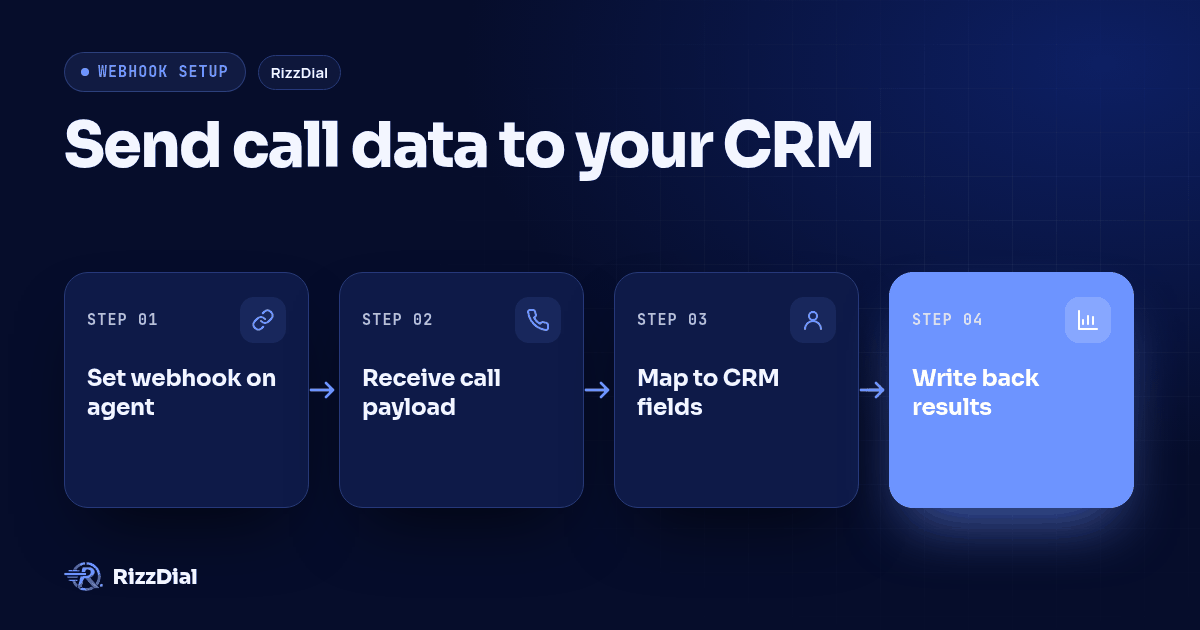
The call ends, the agent's summary and transcript exist, and none of it is in your CRM yet. A per-agent post-call webhook closes that gap with one HTTP request. Below: setting it, receiving it in Python and Node, mapping it to CRM fields, and writing results back. Verified against the live OpenAPI spec and the production webhook code path on 2026-09-24.
Answer first: Each RizzDial AI agent can hold one webhook URL. When a call is analyzed, RizzDial sends a single request to it (GET or POST, whichever you configured) with a JSON body describing the call. Put a secret token in the URL or a custom header and check it, respond 200 quickly, treat
call_idas the idempotency key, and reconcile againstGET /api/ai/call-historyon a schedule.
Setting the webhook
Two ways, and the API spelling is unusual, so copy it exactly.
At agent creation, POST /api/ai/agent/create accepts weebhook_endpoint and weebhook_endpoint_method (GET or POST). Every field on that endpoint is optional; omitted values get dashboard defaults.
curl -s -X POST "https://app.rizzdial.com/api/ai/agent/create" \
  -H "Authorization: Bearer YOUR_TOKEN" \
  -H "Content-Type: application/json" \
  -d '{
    "agent_name": "Inbound Intake",
    "general_prompt": "You are an intake assistant for a roofing company.",
    "weebhook_endpoint": "https://hooks.example.com/rizzdial/calls?token=YOUR_WEBHOOK_TOKEN",
    "weebhook_endpoint_method": "POST"
  }'
For an agent that already exists, set it in the dashboard: open the agent, go to the Advanced tab, and use Configure Webhook Endpoint under Tools and Testing, which takes a URL and an HTTP method. Custom headers configured on the agent are sent with the request, which is the cleaner place to put a token if you would rather keep it out of the URL. The Advanced tab docs page shows both panels.
Use POST. The payload is a JSON body either way, and many frameworks, proxies and CRMs ignore or drop a body on a GET request.
What arrives
One request per analyzed call, with headers Content-Type: application/json and Accept: application/json, plus any custom headers you configured on the agent. The body fields:
| Field | What it holds |
|---|---|
call_id |
The call's unique id, and your idempotency key |
agent_id |
Which agent ran the call |
call_duration |
Length of the call |
call_type |
How the call was placed |
from_number |
The number the call came from |
to_number |
The number dialed |
call_successful |
Whether the call is counted as successful |
hangup_reason |
How the call ended, for example user_hangup |
direction |
inbound, outbound or web |
call_summary |
The agent's written summary |
call_transcript |
Full transcript text |
user_sentiment |
positive, negative or neutral |
call_recording |
URL to the recording |
appointment_date |
Set when the agent booked something |
created_at |
When the call record was created |
A realistic body:
{
  "call_id": "call_abc123",
  "agent_id": "agent_xyz456",
  "call_duration": "00:02:35",
  "call_type": "phone_call",
  "from_number": "+16304087965",
  "to_number": "+17735551234",
  "call_successful": "Yes",
  "hangup_reason": "user_hangup",
  "direction": "outbound",
  "call_summary": "Lead confirmed the roof is around twenty years old and asked for an inspection next week.",
  "call_transcript": "Agent: Hi, is this Jane? ...",
  "user_sentiment": "positive",
  "call_recording": "https://example.com/recordings/call_abc123.mp3",
  "appointment_date": "2026-10-01 14:00:00",
  "created_at": "2026-09-24T18:02:41Z"
}
Two things to plan for. First, anything the agent collected through a custom function or tool call is merged into the same object as extra top-level keys, named by whatever you called them when you configured the action, so your receiver should keep unknown keys rather than reject them. Second, there is no contact identifier in this payload, so decide up front how you match a call to a record: keep your own map from the call_id returned when you started the call, or match on to_number.
A Python receiver
Flask, with a token check, a fast acknowledgement, and deduplication on call_id. The work happens after the response, on a worker thread here and on a real queue in production.
import os
import threading

from flask import Flask, jsonify, request

WEBHOOK_TOKEN = os.environ["RIZZDIAL_WEBHOOK_TOKEN"]
KNOWN_FIELDS = {
    "call_id", "agent_id", "call_duration", "call_type", "from_number",
    "to_number", "call_successful", "hangup_reason", "direction",
    "call_summary", "call_transcript", "user_sentiment", "call_recording",
    "appointment_date", "created_at",
}

app = Flask(__name__)
seen_call_ids = set()
lock = threading.Lock()


def token_ok(req):
    supplied = req.args.get("token") or req.headers.get("X-Webhook-Token", "")
    return supplied == WEBHOOK_TOKEN


@app.post("/rizzdial/calls")
def receive_call():
    if not token_ok(request):
        return jsonify(error="forbidden"), 403

    payload = request.get_json(silent=True) or {}
    call_id = payload.get("call_id")
    if not call_id:
        return jsonify(error="call_id missing"), 400

    with lock:
        if call_id in seen_call_ids:
            return jsonify(status="duplicate"), 200
        seen_call_ids.add(call_id)

    threading.Thread(target=handle_call, args=(payload,), daemon=True).start()
    return jsonify(status="received"), 200


def handle_call(payload):
    collected = {k: v for k, v in payload.items() if k not in KNOWN_FIELDS}
    crm_fields = {
        "phone": payload.get("to_number"),
        "last_call_outcome": payload.get("call_successful"),
        "last_call_sentiment": payload.get("user_sentiment"),
        "last_call_recording": payload.get("call_recording"),
        "last_call_summary": payload.get("call_summary"),
        "last_call_at": payload.get("created_at"),
    }
    crm_fields.update(collected)
    upsert_into_crm(crm_fields, note=payload.get("call_summary", ""))
Return 200 before you do anything slow. A receiver that calls three CRM APIs inline, then times out, loses the payload outright, because nothing comes back for it.
A Node receiver
The same contract in Express. Note the string concatenation instead of template literals, and the crypto.timingSafeEqual comparison so the token check does not leak length by timing.
const crypto = require("crypto");
const express = require("express");

const app = express();
app.use(express.json({ limit: "2mb" }));

const WEBHOOK_TOKEN = process.env.RIZZDIAL_WEBHOOK_TOKEN;
const seen = new Set();

function tokenOk(req) {
  const supplied = req.query.token || req.get("X-Webhook-Token") || "";
  const a = Buffer.from(String(supplied));
  const b = Buffer.from(String(WEBHOOK_TOKEN));
  return a.length === b.length && crypto.timingSafeEqual(a, b);
}

app.post("/rizzdial/calls", (req, res) => {
  if (!tokenOk(req)) return res.status(403).json({ error: "forbidden" });

  const payload = req.body || {};
  if (!payload.call_id) return res.status(400).json({ error: "call_id missing" });
  if (seen.has(payload.call_id)) return res.status(200).json({ status: "duplicate" });
  seen.add(payload.call_id);

  res.status(200).json({ status: "received" });

  setImmediate(() => {
    handleCall(payload).catch((err) => {
      console.error("call " + payload.call_id + " failed: " + err.message);
    });
  });
});

async function handleCall(payload) {
  const crmFields = {
    phone: payload.to_number,
    last_call_outcome: payload.call_successful,
    last_call_sentiment: payload.user_sentiment,
    last_call_recording: payload.call_recording,
    last_call_summary: payload.call_summary,
    last_call_at: payload.created_at,
  };
  await upsertIntoCrm(crmFields, payload.call_summary || "");
}
Keep seen in Redis or your database rather than process memory once you run more than one instance, and give the entries a lifetime of a day or two.
Mapping to a CRM
The shape is the same across the major CRMs even though the vocabulary differs. Land the narrative content as an activity or engagement record on the contact, and land the categorical content on fields you can filter and report on.
| Payload field | Where it belongs | Type |
|---|---|---|
call_summary |
Body of a logged call activity, or a note on the contact | Long text |
call_transcript |
Attachment or a long-text field on the activity | Long text |
call_recording |
URL field on the activity, not free text | URL |
call_duration |
Duration on the activity record | Number or interval |
direction |
Direction on the activity | Picklist |
user_sentiment |
Field on the contact, last call sentiment | Picklist |
call_successful |
Field on the contact, last call outcome | Picklist |
hangup_reason |
Field on the activity, for diagnosing bad lists | Picklist |
appointment_date |
Creates a meeting or task, not just a field | Datetime |
created_at |
Timestamp on the activity | Datetime |
| Tool-call keys | Custom fields matching what you asked the agent to collect | Varies |
Two rules save cleanup later. Create the picklist values in the CRM before you send data, or writes fail on values that do not exist. And give call_id a field of its own, because it is the only reliable key for checking whether a call was already logged.
Writing back to RizzDial
Enrichment often runs the other way too: your system decided something, and the RizzDial record should reflect it. Three endpoints do most of the work, all bearer-authenticated, and all taking base64 ids.
import base64
import os

import requests

BASE = "https://app.rizzdial.com"
HEADERS = {
    "Authorization": "Bearer " + os.environ["RIZZDIAL_TOKEN"],
    "Content-Type": "application/json",
    "Accept": "application/json",
}


def encode_id(numeric_id):
    return base64.b64encode(str(numeric_id).encode()).decode()


def add_note(contact_id, note):
    body = {"contact_id": encode_id(contact_id), "note": note}
    return requests.post(BASE + "/api/contacts/notes/add", json=body, headers=HEADERS, timeout=15)


def set_disposition(contact_id, disposition_id):
    path = "/api/conversations/contacts/{id}/disposition".replace("{id}", encode_id(contact_id))
    body = {"disposition_id": encode_id(disposition_id)}
    return requests.put(BASE + path, json=body, headers=HEADERS, timeout=15)


def move_stage(contact_id, stage_id):
    body = {"contact_id": encode_id(contact_id), "stage_id": encode_id(stage_id)}
    return requests.post(BASE + "/api/pipeline/contact/move-stage", json=body, headers=HEADERS, timeout=15)
POST /api/contacts/notes/add requires contact_id and note. PUT /api/conversations/contacts/{id}/disposition takes a disposition_id that must belong to your company; list the available ones with GET /api/disposition. POST /api/pipeline/contact/move-stage needs both ids, and when the pipeline is linked to LeadConnector and the contact is linked there, it creates or moves the matching opportunity too.
The numeric contact id is not in the webhook payload. Get it from GET /api/ai/call-history, whose records carry contact_id, or from GET /api/contacts/list, then base64-encode it as above.
Reconciliation
A deploy, a five-minute outage or a 500 from your own code and that call is simply not in your CRM. So run a sweep, hourly or nightly.
import logging

import requests

BASE = "https://app.rizzdial.com"
DIRECTIONS = ("outbound", "inbound", "web")


def calls_for_day(day, agent_id, headers):
    records = []
    for direction in DIRECTIONS:
        params = {
            "agent_id": agent_id,
            "start_date": day,
            "end_date": day,
            "direction": direction,
            "per_page": 30,
        }
        res = requests.get(BASE + "/api/ai/call-history", params=params, headers=headers, timeout=30)
        res.raise_for_status()
        data = res.json()["data"]
        records.extend(data["records"])
        if data["pagination"]["last_page"] > 1:
            logging.warning("more than one page for " + agent_id + " " + day + " " + direction)
    return records


def backfill(day, agent_id, headers, already_logged):
    missing = [r for r in calls_for_day(day, agent_id, headers) if r["call_id"] not in already_logged]
    for record in missing:
        handle_call(record)
    return len(missing)
Three details. per_page is capped at 30, and the spec documents the filters above but no page parameter, so the code partitions by agent, day and direction and warns when last_page comes back greater than one; if you need deeper paging, confirm the parameter in the Swagger UI before relying on it. There is no call_id filter, so the dedupe is client-side, which is what already_logged is: the call ids your CRM already holds. And because both the live path and the sweep key off call_id, re-running the sweep over a processed day is harmless.
Two alternatives worth knowing
The workflow webhook action. A RizzDial workflow can be triggered by AI call details and includes a webhook action that POSTs to any URL, so you can send a shaped payload only for calls that match a condition. Useful when you want the branching in the dashboard rather than in your receiver.
The built-in GoHighLevel sync. If GoHighLevel is your CRM, you may not need a receiver at all. The agent's Integration tab syncs recording, transcription, sentiment, summary, duration and direction into GHL custom fields you map, and applies outcome tags such as Answered, No Answer, Voicemail and Appointment Set. Details in the GoHighLevel AI dialer integration guide. Triggering calls from the other direction is covered in triggering AI outbound calls from GoHighLevel.
A reminder on the calling side: the FCC's February 2024 declaratory ruling treats AI-generated voices as artificial voices under the TCPA, so consent belongs in your own records before a call happens, and the transcripts you are now storing are part of that record. See our TCPA and FCC rundown. Not legal advice.
Frequently asked questions
Can I subscribe to specific events like call started?
No. This is one post-call delivery per analyzed call, not an event stream, and there are no event type names to filter on. If you want branching on call details, a workflow with the AI call details trigger and a webhook action is the closer fit.
Why is the field called weebhook_endpoint?
That is the spelling the API uses on POST /api/ai/agent/create. Copy it verbatim, including the doubled e; a correctly spelled webhook_endpoint is not the field this endpoint documents, so the webhook will not be set.
Can several agents share one receiver?
Yes, and they should. Every payload carries agent_id, so route on that inside your handler. Give each agent its own token if you want to revoke one without touching the others.
How do I know which contact a call belongs to?
Store the call_id returned when you started the call against your own record, or match on to_number. For the RizzDial numeric contact id, read contact_id from GET /api/ai/call-history.
What do I do with the extra keys from tool calls?
Treat them as data, not noise. Anything the agent collected through a custom function arrives at the top level of the same object, so copy the unknown keys into their own CRM fields and log the names you have not seen before.
The RizzDial API is available to RizzDial customers: an OpenAPI 3.0.3 spec covering 224 endpoints, a Swagger UI at app.rizzdial.com/api/docs, and a remote MCP server for Claude, Codex and Grok. Get API access or book a call.
For the next step in this workflow, review the ai voice agent workflow guide and discuss implementation through the AI calling integrations.
About RizzDial
RizzDial is the AI outbound sales workspace for teams on GoHighLevel. Power dialing, AI voice agents, SMS automation, and CRM workflows in one platform. Book a demo.